Skip to content

Author: Iris

Shifting Patterns

I realized this evening, as I checked my mailbox on the way back home, that communication patterns have really shifted. At least, they have for me. There was a time when I’d open mail addressed to me as soon as it was delivered, but I’d only check email once or twice a week. Now I check email multiple times per day, but I only open my accumulated snail mail about once a week.

2 Comments

Why I’ll be Wearing Comfy Shoes Tomorrow

New students arrived this week. Yesterday there were new student week leaders dancing on our welcome sign all morning. (That’s quite a reception as you’re going to work!) Tomorrow I’ll be staffing the library table at the academic fair, leaving that a little early so that I can help host the library’s annual picnic for faculty and academic staff, working frantically on a couple dozen last-minute projects, and then helping out with the library’s annual murder mystery event (which gets started at 9pm).

I’m simultaneously looking forward to it and dreading it. Each of these things sounds like a whole lot of fun. The whole, though, sounds like it’ll much more tiring than the sum of it’s parts. I will therefore be wearing distinctly unfashionable, comfy shoes. Stereotype, here I come! Too bad I just got my hair cut today and can’t make a bun anymore.

3 Comments

Mission: LSSP

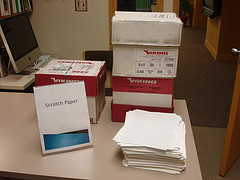
This is how I ended up with 5 feet of scratch paper, no real idea of where to store it all, and the warm fuzzies for all my co-workers who instantly donated more paper than I thought we’d collect in a year.

Hello All,

As you probably know, the introduction of print management last year brought about a huge reduction in paper use here in the library (to the tune of about 17% less paper used!). With fewer duplicate print jobs being sent to multiple printers, fewer accidental print-outs, and more attention being paid to what and how much was being printed, we saw the massive piles of unclaimed printouts dwindle down to a few sheets here and there. And there was much rejoicing in the land.

Much rejoicing until students wanted scratch paper to write on, that is. Having grown accustomed to a Limitless Supply of Scratch Paper (hereafter called the LSSP) near the printers, students took to opening the printers and removing sheets of paper from the printer trays. Not only is this poor use of ITS supplies (they do not exist to underwrite students’ scratch paper needs), but the opening and closing of the printer trays seems to have caused a sharp increase in the rate at which those trays go out of alignment and need repairs. Clearly, something needs to change, and asking students to buy notebooks would probably be met with blank stares.

What we need is a good old bait and switch. To this end, the printer area will serve as bait (so much paper, so much history of free paper, so much traffic in general), but when the students arrive at the printers we will dazzle them with big, beautiful stacks of scratch paper which will mimic the LSSP. Not only will this fill a clear public service and save ITS many printer-tray-related headaches, but it will also be a good use of paper that would otherwise be recycled only partially-used.

Your mission, should you choose to accept it, is to help us collect this precious scratch paper. On the middle shelf of the cart near the main black and white printer in the TS area you will find a double-decker Paper Collection Device (PCD). The top level of this PCD, the one marked “Scratch Paper,” is for paper that has been printed on one side and that contains no sensitive information (remember, this will end up in the hands of students) or even paper that is blank on both sides but is no longer fit for the printer. The lower level of the PCD is for anything else (colored paper seems to inhabit it now). The SCIC students [explanation of these students] and the reference librarians will use the paper from this PCD to attempt to keep a pile of scratch paper by the printers dazzling, big, and beautiful in order to mimic the LSSP as closely as possible.

I know what you’re thinking, but don’t worry, this message will not self-destruct.

Best,
Iris
4 Comments

New Things, a Round-Up

There have been quite a few new (or new-to-me) things to experiment with lately. Of course, this directly coincided with the ramp-up for Fall term, so I haven’t done very thorough explorations. But here’s what I’ve fired up at least once lately.

  • Ubiquity
    The link will take you to information about this Firefox extension. I don’t normally watch videos online (I know, I know, but my connection at home isn’t fast enough to make the experience pleasant), and this one started off cheesy, but it got interesting fast. I’d love to see a set of commands for libraries that I could subscribe to. Searching the catalog, proxifying stuff, citation generation, open URL resolving… and that’s just the stuff that we can already do using existing tools. It seems like the possibilities for on-the-fly mashups are almost limitless.
  • DragDropUpload
    This is another Firefox extension that I just found and LOVE. It lets me drag a file onto the upload dialog box for things like my email, and it’ll fill in the file path for you. None of that annoying stuff like clicking “browse” and then navigating through your computer’s file structure. So Easy.
  • EverNote
    I’ve been using Evernote for years, but the new version is significantly different. I’m not a fan of the rate and number of upgrades it goes through (really, do you want to emulate iTunes that much?), but it works on my iPod Touch, it captures and interprets screen shots (yes, interprets, as in, reads the words in an image and lets you search them later), and is generally pretty slick.
  • Remember the Milk
    Other people have been using this for a while, so it’s not really “new,” but I hadn’t used it before, so it qualifies for this list. I have a love-hate relationship with task lists of any kind because I usually don’t list out tasks in great detail, preferring to work toward an ultimate goal rather than concentrate on the bits and pieces. Anyway, for now, the Gmail-integrated version seems to let me do my minimalist kind of listing in a way that makes sense for me. The main web site annoys me (too many ways of selecting tasks to modify them, none of them easy… check boxes, roll-overs, direct clicking… everything seems too dynamic to actually let me just get in and change a date), but the gmail integrated list is great.
  • Google Chrome
    This is a brand new web browser from Google (alpha release, PC only). It has potential, but it’s not at a place yet where I can use it comfortably. It doesn’t play nicely with the college’s CMS. It also doesn’t handle extentions, and I love my Firefox extentions. Most specifically, it doesn’t handle adblock (not surprising, considering Google’s reliance on ads). Not having adblock is an education, let me tell you.
  • Digsby
    My co-worker uses this as his chat aggregator. Since Meebo has been on the fritz a lot lately, I downloaded it and use it when Meebo is down. I like it well enough, but when Meebo is up (which is more often this week than last, thankfully) I’m there already anyway, so I’m likely to stay there.
  • WorldCat Copyright Evidence Registry
    I’m on the campus copyright group, so this caught my eye immediately. It draws on OCLC’s collected information about the books held in thousands of libraries, and highlights the information that’s relevant for copyright research. Ideally, people will start adding more and more copyright-relevant information to these records.

What have I missed?

2 Comments