Skip to content

Author: Iris

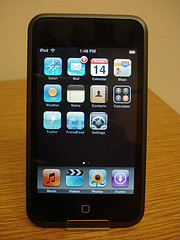
The iPod Touch, One Work Week In

Well, I’ve had a full work week to bond with my new toy, and let me tell you, we are now attached at the hip. It does everything I need it to do and more (unless I’m out of wireless network range, but even then I can see my calendar thanks to the 2.0 version of the firmware). Since people asked me for my impressions, I thought I’d write up this list of pros and cons, and then throw in a my current list of things I had to figure out in order to make it do what I needed.

Pros:

  • pretty much everything
    It’s faster to check my calendar on that than it is on Zimbra, since Zimbra is kind of a slow-loading web app, so I end up using it when I just need to quickly check up on my appointments for the day. And since mobile calendaring was the primary goal of the purchase, I’d call the purchase a grand success. Everything else is gravy. And boy is there a lot of gravy. Email and contacts sync, too, and having web access is so handy. I can imagine taking this down into the stacks and checking call numbers and locations right there with students.
  • Apps
    I loving having Pandora Radio, Evernote, and Twitter apps with me all the time.
  • Lunch break listening
    I like the option of having music and books-on-iPod with me even at work. Sometimes you just need to get away at lunch, plug in, and forget about work.
  • Event notification
    I’ve turned off the sound effects so that it won’t let everyone in the room know when I receive an email or have an appointment coming up, but the screen still lights up and displays allerts about upcoming appointments, which I love.
  • Intuitive, mostly
    Except for the little trick about scrolling with two thumbs if you have to be on a web page that contains a scrolling text box, I never had to think about how to move around and zooming in and out of pages.

Cons (mostly minor… did I mention I love the lil thing?):

  • Battery life
    This is so far the only little electronic thing that I have to charge every day, and I don’t listen to music on it for more than 20 minutes a day.
  • Sounds without granular control
    I’d love to turn off the sounds that tell me I’ve gotten email while keeping the sounds that tell me I’ve clicked something, or that I have an event coming up. Right now, it’s all or nothing with the sounds.
  • Browser flips sideways (easier typing) but most apps don’t
    Typing while the keyboard is squished into the portrait version of the screen can be quite an exercise in precision and aim. It’s much easier when you can flip the screen to landscape orientation, but most apps don’t allow for that.
  • Can’t get to any but my main calendar in Zimbra (UPDATE: see comments)
    This may be just for Zimbra users, but there’s no way to get to calendars other than your default calendar. The web interface won’t let me leave the mobile version, which only shows the default calendar, and the calendar app only syncs with the default calendar. I’ve been in the habit of printing my default calendar to hang on my office door, but if I have to put things like doctor’s appointments in that calendar, I won’t be printing that stuff out to hang on my door. But I think that’s ok. Students and co-workers are much more accustomed to finding schedules online now, so I doubt anyone will miss it.

Things to know to make it work right (from my perspective)

  • Zimbra connection is achieved by setting up the Microsoft Exchange account options (as I noted in my previous post). Using these settings, I can let it sync wirelessly!
  • Two-thumbed scrolling gets you around on web pages that have scroll boxes in them.
  • You can uncheck “open iTunes when you plug this iPod in” for easier work re-charging (since an iPod can only sync with one installation of iTunes, and I regularly work with three to four different computers).
  • You can reorganize the icons on your main screen (as pointed out in the guide that comes with the iPod).
  • Searching google for instructions or apps or anything will go better if you search for iPhone and just realize you don’t have the phone or camera functions. Fewer people are writing about the iPhone’s lesser cousin, the iPod Touch.
  • The little plastic hook thingy that comes with the iPod is a stand. This was not obvious to any of us.
  • Bookmarking things (like google or the library catalog or google reader) is great. Placing icons on the main screen is even better.
11 Comments

Learning about Instruction from Subject Librarians

The past week has served as a clear and present reminder of the value of having subject librarians who are committed to helping students in their disciplines engage with and even contribute to the scholarly work of their chosen areas of study. Partially prompted by a desire to train our new librarian, and partially driven by our constant refrain of “wouldn’t it be nice if we could meet and tell each other about what we each do with our students,” my department met three times between last Thursday and today to do a little show and tell. Over the course of those 6 hours, we showed each other key resources in our areas, walked through pieces of lessons that we’ve developed, talked about common challenges and triumphs, and even did mock instruction sessions for each other. I learned so much.

I had never considered the value of surgical videos in the life of a materials scientist. I love the idea that when you read anything from a record in an index to an article or a book, you have to think about reading instrumentally as well as reading for comprehension. There are always clues to new research topics or subtopics, new search terms, and even information about how the search tool or topic or disciplinary discourse is structured. Reading instrumentally involves paying attention to all these things. I had no idea that we’d just acquired an archive of opera videos and another of dance videos, each of which let you search through rich metadata, create playlists of clips, and turn on a variety of subtitles. I learned a metric brainload about ICPSR, WDI (both online and off), and other key data sources, and how these get used in our curriculum. For example, did you know that Earth Trends is useful for way more than environmental research? I didn’t. But it turns out that in order to study the environment you have to study a bunch of other things, too, so Earth Trends ends up being a kind of statistical compendium. And it cites its sources, so you can figure out who’s publishing data on your topic. And I learned a lot by listening to our History librarian talk about the role of book reviews in research, and how teaching book reviews is a great way to introduce students to concepts like scholarly disagreement or how individual works fit into the broader universe of disciplinary conversation.

I showed a few things, too. I showed my “subversive handout” and my work on teaching scholarly attribution, the problem of controlled vocabulary for my students (since they have to work with the MLA International Bibliography, which relies so heavily on it’s thesaurus), and my lower-level work with students who need to learn about combining terms when performing searches.

Beyond learning really interesting and cool things, though, I was struck by the fact that even though we spend so much time working together, talking together, and sharing strategies with each other, that doesn’t even begin to scratch the surface of our individual stores of subject expertise. We rely on this structure of shared general knowledge backed up by deep subject expertise all the time. For example, I can sit at the reference desk and know that I can help a student get started with research in an unfamiliar area, but that I can (and frequently do) refer that student to the subject librarian for more in-depth help if we have to go beyond my own ability to be of any use. And in instruction sessions, the librarian that deals primarily with upper level social science students relies on the fact that I tend to work with a lot of lower level students, and that I give those students a grounding in some of the basics. We absolutely rely on the fact that we don’t each have to know everything and teach everything, and that our colleagues will be there for us when we get in over our heads with unfamiliar research areas. So our differences really do serve the student population as a whole.

And I feel like I’ve become a better librarian simply by being surrounded by subject specialists. I know more about how to find data and statistics than I did before because I’ve been able to watch our data librarian at work. I’ve learned (and stolen shamelessly from) our History librarian and the way she guides students through the process of finding and using primary sources. And the similar things could be said about any one of the other librarians I work with.

4 Comments

New Toy


New iPod Touch
Originally uploaded by Pegasus Librarian.

I’m SO excited!!! For the last year my co-workers and I have had no mobile calendars (as I’ve written about at some length). Well, after letting us test both the iPod Touch and the newer wireless Palm, my work decided to let us choose our favorite toy… er… device. I chose the iPod Touch, and today IT CAME. I spent a few hours getting it set up with updated software, registering it with the campus wireless network, and then figuring out how to sync it with my calendar, mail, and contacts. What fun!!!!

By the way, in case anyone else is wondering how to sync Zimbra with an iPod Touch or iPhone and can’t find any documentation from either Zimbra or Apple, no, you’re not insane. The instructions just aren’t out there. What you do is:

  • make sure you have the 2.0 version of the iPod software and the latest Zimbra upgrade
  • set up a new mail/calendar/contacts account
  • select “Microsoft Exchange”
  • and then enter your Zimbra account information

After that, things should work beautifully.

4 Comments

Feeling Like a Celebrity

Everyone should be lucky enough to know a graphic artist! Just hours after I mentioned that my ultimate dream was to have a Pegasus image for my blog header, the amazing Tim Keneipp emailed me an image. I fell in love with that statue Pegasus instantly.

Of course, then came hours and hours of fighting with Blogger to make it sit right on the page (I’m sorry, Tim. I didn’t know it’d be such a hassle). But now each time I look at my blog I think about how talented and generous Tim is.

9 Comments