Skip to content

Category: Tools and Technology

Morning of Nerddom: appointment schedulers and feedback forms

First of all, I’m back! I’ve been devoting any writing energy to some article revisions, but now those are all submitted and I don’t have to feel guilty about cheating on my article with my blog. What a relief.

Anyway, this morning I spent nearly all of my time shirking other responsibilities in order to set up an appointment scheduler and some feedback forms. A couple of my colleagues use and love schedulers, so I thought I’d give it a try, and I’ve been hearing non-stop lately about the value of very very brief assessment, so I thought I’d try that in a more formalized way, too.
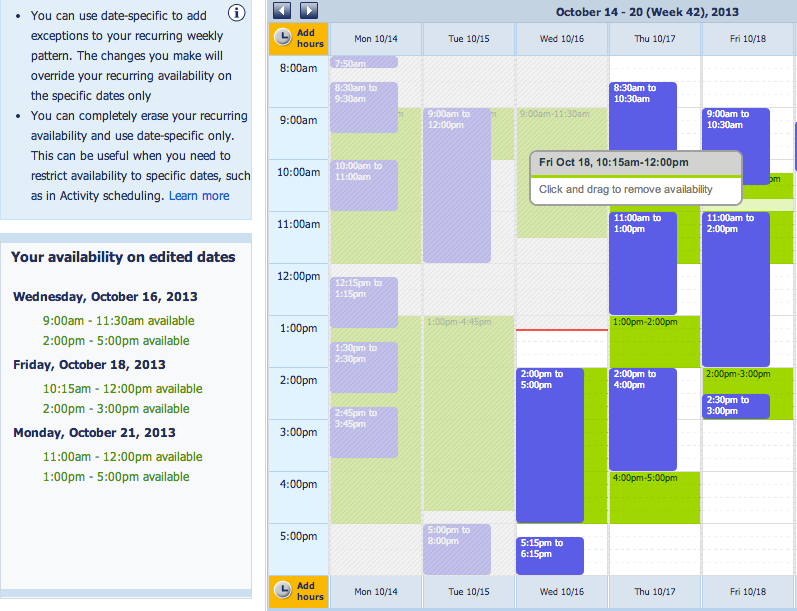
How my calendar looks to the scheduler
How my calendar looks to the scheduler. Blue is “busy” time from Zimbra via Gcal (this trumps available time). Green is available time that I can add to or erase by clicking and dragging.

I heard about ScheduleOnce on a recent friendfeed thread and made an account almost on a whim. “I’ll poke around and maybe set it up later.” Famous last words. It’s pretty nifty and lets me do pretty much all of the things I want, and some things I didn’t know I wanted. For example, I could set it up to send a reminder email to the student (maybe fewer no-shows?), and tell it how soon before the desired appointment time a student can book me. The one catch is that it’s made to work with Google Calendar, and my school uses Zimbra, so I had to import my Zimbra calendar into a google calendar (there are some limitations with this, but it’s better than nothing) and then tell ScheduleOne to look at the imported calendar for busy times (which required an upgrade to the $5/month plan). But if it works, it’s totally worth it to me.
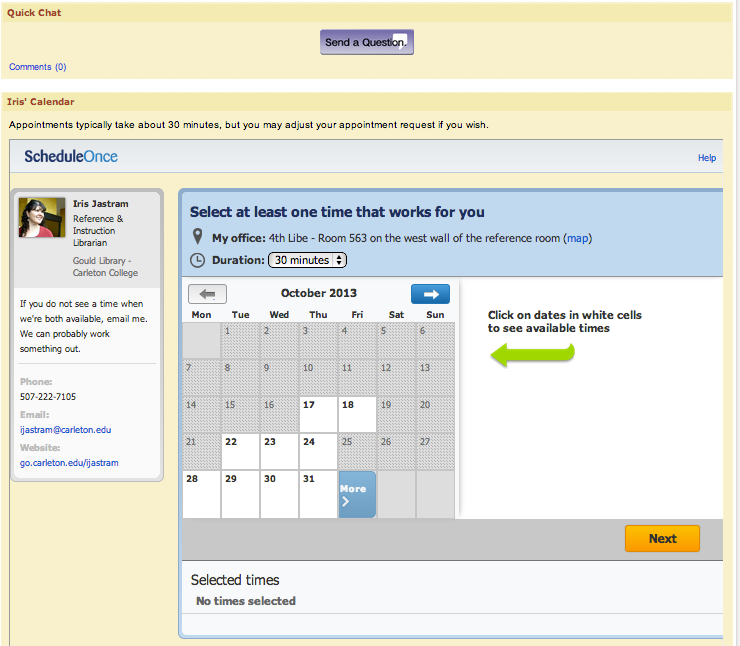
What my students see

After a couple hours of tinkering and testing and tinkering and importing and syncing and cursing Zimbra/Gcal quite contentedly, I embedded the scheduler page in my liaison page and thought I was done.

Then I remembered the “follow-up email” option in the scheduler that I had turned off. Who needs more email, right? Well, maybe people will give me some basic feedback if I ask nicely. So I hopped over to Google Docs and made a feedback form that basically asks two questions: “how satisfied are you” and “do you have follow up questions” (if yes, email me, because this form doesn’t collect any identifying information. Then I leave the traditional optional space to tell me more. Done. I added the link to a follow-up email thanking the student for the research meeting and telling them to email me if they have further questions, and I figured I was done.

But no. This made me think of the people talking about having students fill out forms embedded in libguides at the end of instruction sessions. I’ve done the “on the front of the notecard write something that was new and/or helpful; on the back write something that is still confusing or you’d like to know more about” kinds of exercises on occasion, and I’d love to do more of them, but I often don’t have notecards at the last minute. So I basically made that into a Google Form, embedded it in a page on libguides, and now I’m set to copy that page to any other guides I make. Tada!

And thus ends my morning of nerddom.

Update: 10/31/2013

This is going exceptionally well so far. I’ve done a few user error things along the way, but over all it has been such a help. Almost no futzing with calendars every day, and almost no back-and-forth emails with students about meeting times. I’m in love!

3 Comments

How vegging out in front of the boob tube improved my professional skills

I’ve been going for the most passive of all passive entertainment the last couple of weeks while my health has been on the fritz. The hard part of my super-passive entertainment regimen is right at the beginning, where you choose a series on Netflix, preferably one with many episodes since the initial choice is the brunt of the work. Man, I wish I liked Mad Men… Anyway, after that initial hard work Netflix does the rest for you — all you have to do is wait for the next episode to cue up for you, and the next, and the next.

So there I was, catatonic in front of the screen on Sunday evening. There may or may not have been drool. I probably hadn’t showered recently. There were probably orange peels scattered around my coffee table (I’ve been on a bit of an orange binge lately). Netflix was serving up endless episodes of one of my favorite genres: BBC mysteries. You know the ones. They have an interesting, complex character for the main detective, and then far more murders than any one tiny country town in the British Isles could possibly sustain without completely depopulating. I love them. Anyway, this particular detective (Inspector George Gently) has an annoying, immature jerk of a second in command (Sergeant Bacchus), Gently has to spend some considerable time explaining to Bacchus just how prejudiced and immature he really is. In this particular episode, Bacchus’ primary vice was “racialism.”

Hold on! Racialism? You mean, in the UK people are Racialists rather than Racists? Or at least it’s a totally accepted term for that form of prejudice?

So, being the librarian that I am, I told my coworkers the next morning about my startling discovery, and we started searching Google Scholar, as one does. Turns out, you get two pretty distinct sets of results if you search for racialism vs racism. So bear that in mind next time you’re searching a free-text database.

Next weekend I intend to continue my vegging… er… RESEARCH. For science.

[UPDATE: My friends in the UK say that “racialism” is an old fashioned term for the concept. It still yields interesting and useful Google Scholar results, should be in a dwindling minority for contemporary scholarship.]

Comments closed

Good searching really isn’t about searching

I’m a librarian. My brand is Search. And I do a lot of searching every day, and I know a lot of fancy ways of making that search go well for me (much of the time). But today a chance comment underscored something I think I’ve always known: good searching really isn’t about Search, or at least not in the way that people think of Search.

Here’s what happened this morning. I’m part of a grant-funded “iPad Learning Community” on campus. We get iPads (woo!) and we commit to attending learning community sessions several times during fall term to build a better understanding of how iPads work with higher education. So I’ve been doing a lot of experimenting with iPads lately, and one of my favorite things to do on an iPad is read and annotate PDFs (I’ve been using iAnnotate, though I just got Good Reader to play with, too). The thing is, it gets very tiring to write without letting your palm hit the iPad surface, and if your palm hits the iPad surface it can suddenly not tell where the tip of your finger or stylus is and so annotation goes all wonky.

So I fired up my trusty Google, and typed in iPad stylus wrist guard thinking that these were probably terrible search terms but thinking that any page that used all of those terms would probably talk about the problem I was having. Even if all I found was someone else talking about the problem, I might learn better ways to ask the question, or see someone’s answer to the question. Meanwhile, Google suggested as I typed, and thought maybe I should search for iPad stylus wrist protection, which seemed reasonable to me, so I hit “search.”

I don’t remember the next steps very clearly because this was yesterday, and yesterday is a long time ago, and I did it all really fast and without thinking too hard because this is what I do for a living — find stuff when I don’t really know what I’m looking for or how to ask the question. But eventually I learned that there’s a useful term, “palm rejection,” which is the name of a feature that people aim for in tablet applications. So I searched for iPad palm rejection and came up with some pretty useful results, including a site recommending a glove that I’m going to try out.

When I got to the learning community thing this morning, I said I’d found this glove and one of the technologists asked “how did you figure out that it was called palm rejection?” (None of us had heard the term before.) I said, kind of flippantly, “I’m a librarian!”

But then I realized that yes, it was because I had a different goal in mind for searching in the first place. I was first searching for terminology that would help me do a good search. And that’s what I do with students all the time — work with them to figure out what some key terminology might be so that they can make those search boxes work for them.

So I guess good searching, at least in the case of novices looking for information, is often more about learning to look for clues than it is about fancy search strings.

3 Comments

Libraries, IT departments, and complex relationships

We have what I consider to be a really good working relationship with our IT department. When I talk to other people on campus I come away thinking of it as shockingly good, but most of the time I forget what it could be like and just go about the daily business of being in a good working relationship with another department. Their head of public services sits on our Public Services committee. I sit on their Service Points Steering Committee. Their director and ours meet regularly. Their director participates in our leadership team meetings. The people who run their main help desk and I talk nearly daily as we coordinate the running of the public labs (of which the library has 3) and the supervision of the IT student workers who, as a pool, staff both their main help desk and our Research/IT desk.

What’s more, we’re also friends. Most of us, anyway. There are a few people I don’t really know or understand over there and I’m sure the same is true when they think of us. But really, I’m going to movie night at one of their houses tonight and another one and I have swapped books and another and I meet to knit together nearly every Saturday morning. We confide in each other. We’re friends.

So yes, things are good. But as with any relationship, things are also complex.

We had a joint retreat recently, and one of the questions several of us raised in our breakout groups — the question that’s kicked around in my head since then — is how to have a truly collaborative relationship when the library is about 90% customer of IT and 10% collaborator with IT. We have complex systems that they support. We have weird old fashioned printers (i.e. label printers) that we really need but that don’t work most of the time. Our web presence is complicated. Our need for public technology infrastructure (and bandwidth) just keeps increasing. Some of us want to tinker with all kinds of geeky stuff, and some of us need help copying and pasting. I don’t know if we’re their most complicated customers on campus, but we’re probably right up there.

So there’s a weird power dynamic there, and potential for either side to get resentful: us if we think they’re not helping us enough and them if they think we’re demanding too much time or resources. And we wondered how to even out that power differential a bit in hopes of keeping a good thing going and making it even better and more sustainable. What is it that we offer them?

Currently, we’re one of the best places on campus to test equipment and software. We’re a high traffic building and one of the few on campus that’s frequented by faculty, staff, and students. And we’re also pretty good at soliciting and communicating feedback. So when the college was deciding on a campus-wide printer/scanner/copier model, we were the main test site. When they institute new software or interfaces, we can usually tell them how it’s being received by our students.

We also offer a space where IT can have direct contact with students who are in the midst of doing their work. The main lab in the library is the reference room, with the joint Research/IT service desk and the two busiest printers on campus. One thing that our IT department doesn’t have much of right now is very direct connections to the curriculum and student engagement with their academic work on campus, and since that’s really the core of the campus’ mission and ethos, figuring out how to engage with that enterprise would be a great step. (There is a group of academic technologists that consults with faculty and students about curricular matters, but for the most part they are separate from the main help desk.)

Right now, they’ve come through several years of several iterations of major reorganizations, so I suppose we can offer a sense of stability if we’re in collaborations with them and other departments or individuals.

But what else? Surely there are ways to offer more tangible support for colleagues that we value and that make our work possible. What are some of the things that you offer your IT departments?

7 Comments