Skip to content

Category: Tools and Technology

The ILS Futures Forum: Catalogs and Discovery of the Future


Yesterday librarians from several small institutions in the area gathered to hear Roy Tennant and May Chang (of the University of St. Thomas) talk to us about the future of the catalog and the ILS, and a good time was had by all. The Carleton and St. Olaf librarians were all energized and inspired by what they heard. (And the surroundings couldn’t have been prettier.)

In terms of concepts, I didn’t hear anything that I haven’t heard or read before (thanks to all the amazing bloggers out there working hard to keep me up to date). But Roy was so much fun to listen to, and he spoke with so much enthusiasm and good humor that the whole thing sounded new. For those few of you who want the 4-page version of my notes on Roy’s talk, I’ve put them up here (PDF Word document), but I didn’t want to inflict them on the rest of you.

So what resonated so much? What was it that caused one of the librarians to say, “I was actually, dare I say it, excited,” and that rallied all of us around tagging in the catalog? I think it was a combination of a couple of things. First Roy couched his whole talk in terms of assisting user discovery. Our two libraries have heard a lot recently about workflow redesign because we’ve got a grant to help us do just that. So we’ve been steeped in the rhetoric of “you’ve got to change” and “you’ve got to catch up with those millennials.” What we haven’t heard so much of is what we heard yesterday: “look at all the cool stuff we could do with the metadata you’ve created” and “look at all the cool ways computers can exploit that metadata on behalf of the user.” Roy put the focus squarely on serving the user as the motivation for change rather than on change for the sake of modernization.

Another thing that resonated strongly with our group was the way he placed this change into historical context. First we automated circulation, acquisitions, and cataloging. Then we figured that as long as we had all this stuff computerized, we may as well let the public search through that information, too. Now we’re thinking of ways to create an actual public search interface rather than inflicting our workhorse on an unsuspecting public.

Placed in this context, and delivered with an attitude of “onward and upward” rather than accusations that librarians are digging in their heals, even the most conservative librarians in our group started talking about the possibilities. One person came up with the brilliant idea of finding commonly used tags and reverse-engineering subject headings to match, thus increasing number and usefulness of formal access points. I think tagging would also be a flexible and nimble way to create “scopes” for collections that aren’t actually shelved together.

I’m still not sold on sucking Amazon information and book covers into the catalog (mentioned several times throughout the day). I’m all for images of book covers, but I wish that if you clicked on them you wouldn’t get pulled over to Amazon and into the world of buying rather than borrowing. I wouldn’t baulk at having options show up to interlibrary loan or buy a book that is checked out, and I like having reviews handy… I guess I just want to have my cake and eat it too. Call me a stogy librarian who’s digging in her heals over change… :)

p.s. A big thank you to the chef at the conservatory for making me the best special-order lunch I’ve EVER had. It’s the first time I’ve ended up with better food than everyone else because of my allergy.

p.p.s. Another big thank you to the people who came up with the idea of having an hour-long question-and-answer session with Roy. What a good idea!

Technorati tags: , , ,

2 Comments

Woah! Meebo Got a Facelift

I just logged in to Meebo (hoping to find a little human interaction) and almost didn’t recognize the new, spiffy interface. And according to their blog post, it’s not just the visual part that got an upgrade. Now you can pop a chat window out of the main browser window, drag and drop people into different buddy categories, more easily manage signing on and off of individual screen names, and more. Cool!

Technorati tags: ,

Comments closed

To Do Lists

I go through phases in my relationship to to do lists. I’m generally an organized person (at least on the surface), but I’ve notice that there are times when to do lists hold massive appeal and times when I can’t look at one. You’d think I’d know what triggers a stretch of the listies, but I don’t. I remember a time when I wasn’t very busy at work and it took a to do list to keep me focused in the face of not-much-to-do, and to help me understand that I really was working. (This was in my first months of work, before I had projects and before anyone on campus knew I existed. This seems like a distant dream from my current vantage point…) At other times I’ve been so busy that to do lists helped me remember what I’d promised people and what helped me managed the steps of multiple concurrent projects.

Right now I’m in a listing phase, so I went looking for an online to do list tool that would let me check in, add, and delete items from any of the four computers I use throughout the day. I tried several, and they all have good points. But here’s how they measured up for my purposes.

  • Ta-Da Lists: Nothing fancy, just to do lists and nothing else. I really like this one, and (for me) it’s runner up because the interface is so easy and it does just what I need. I also got my own URL when I signed up, which made me feel special. I could also share individual lists if I wanted.
  • Voo2do: If you need a project management tool, this is it. You can set deadlines, prioritize, take notes, set estimated times for each list item, categorize by project, publish tasks, add tasks by email, and probably a whole lot more. Frankly, this was too much for me. It meant that I had to do a lot more clicking when all I wanted was to make a list.
  • Bla-ha List: Very nice, but requires a pop-up window that can’t be opened in tabs. For my workflow, if it’s not open in my standard set of “I use them all the time” tabs, I’ll forget all about it and never use it. This would probably decrease the usefulness of the lists.
  • Backpack: My current favorite. It’s put out by the same people as Ta-Da Lists, so it’s really simple, but it also has space for note-taking. I can make separate “pages” for different categories of lists (right now I have “Work” “Personal” and “Copyright” to keep track of the main things I’ve got to do). Each page can have it’s own text, lists, and notes, and you can share pages individually with other people, or publish them to the web. If I want to pay, I could also add the capability to upload files and pictures, but I don’t feel like paying money. Even with the free version, though, I got my own URL.

I can’t believe I’m saying this, but I wish there were a Google To Do list that would work with my Google Calendar. I actually don’t want Google to take on another project before it finishes a couple of the ones it’s already juggling, but this feature would sure be nice.

Technorati tags: , ,

Comments closed

Loving Firefox, Hating the Memory Drain


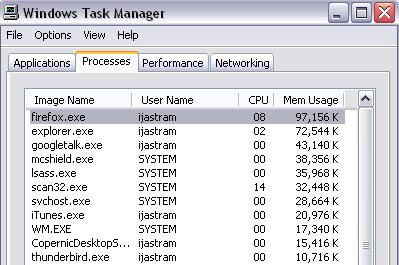
I LOVE Firefox 2.0, but I actually can’t run it on my 4-year-old laptop at home because it uses too much memory. This screenshot was taken after only a few minutes of running on my work desktop!

What do I love? I love, love, love spell check. I love Zotero. I love having individual tab close buttons (though this took a bit of getting used to). I love Control-Tabbing through my open tabs. And I love easy RSS subsriptions.

But mostly I love spell check.

I guess I’ll just have to wait until they fix the memory leak before putting it onto my personal laptop. Phooey.

Technorati tags:

4 Comments