Researchers of Jazz are probably familiar with Lord’s Jazz Discography. It was one of those behemoth reference works that started had ambitions of several dozen volumes containing the most comprehensive collection of information about jazz recordings ever compiled. And they did publish volume after volume. But for some reason, our library stopped collecting after the middle of the Gs, and now the following volumes are out of print. This makes any kind of research rather difficult unless you happen to want to study an artist who’s name begins with A-Gha. Meanwhile, there are a couple of classes offered every Winter term that could really use this resource, if only it spanned the entire alphabet. You can imagine the frustration.
Well, this year, Lord finally came out with a web version of this resource. It wasn’t very expensive, and it made a familiar but unusable resource suddenly usable, so we snatched it up as soon as it hit the interwebs.
Unfortunately, the designers of this unique resource had never heard of interface design. I could go into details, but it would just make me cry, so suffice it to say that it’s almost unusable unless you’ve either designed the thing or worked with somebody who knows how to tease information from it’s unwilling and moody navigation structure. What’s more the “Help” spends more time describing 13 different types of screens you may land in at any point, the space-saving techniques (only relevant to the print version, by the way, but carried over nonetheless), and the wonderfully flexible numbering system that makes this whole dynamic index work without page numbers for reference… it spends more time on these kinds of things than it does on actually navigating the system or explaining that things like phrase searching are impossible. (I only wish I could make things like this up…)
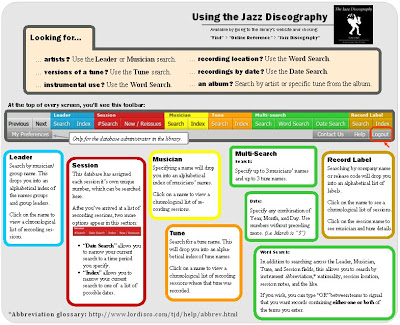
Clearly, the professors and students who will be using this in 2 weeks’ time will need more than that as they begin their research, so I decided to make a user guide before announcing that we’d acquired the database. This guide would give enough information that the click-phobic could click away without worrying that they’d erase the database, and it would be pared down enough to fit neatly on the front and back of a piece of paper (or else nobody would look at it, and it’d be that much wasted effort). Well, I’m pretty good at figuring out systems, so I budgeted a day an a half for this project: half a day to figure out the system, and a day to design the guide.
HA!
I’ve now doubled that time and have only just figured out what it is that I’ll need to do tomorrow to finish up the project! I was not prepared to spend an entire day clicking on everything in sight to see what it did or didn’t do. (True fact: underlined things are not links, regular type is usually a link if it’s a name and not an abbreviation or a number, and the only glossary for the abbreviations that litter the screens is hidden in the “Help” section.) Even after all this time, I still had to educated myself on the history and conventions of the recording industry in order to make sense of the various alphanumeric codes that can accompany any given recorded tune. These things were not included in the “Help” section, by the way. I was not then prepared to spend another entire day trying to create a design for the handout that would distill the craziness down to easy steps and concepts. Today I spent every possible moment trying to make incredibly complex navigation structures seem less overwhelming through manipulation of font and color.
Hopefully I’ll finish this crazy thing tomorrow. But even so, I know that I’ve made this guide for an audience of professors and librarians. There’s no library or search jargon or anything like that, but it’s not nearly as task-oriented as a student would like. As soon as I hear about the assignments that students will receive, I’ll have to evaluate their needs and write up new guides.
Meanwhile, I’ve systematically erased from my whiteboard all the other projects I’d wanted to get to this week, leaving only the few that absolutely MUST happen. And one of those I’ll be doing this evening as I watch something brainless like Project Runway.
… And people wonder what we do when school’s not in session…