I’ve been having a bit of an up-and-down teaching term this Fall — some classes going really well and some falling flat — but one thing that I’ve really enjoyed is that so many of the classes I’m working with are in new subject areas for me, or are taking different approaches than I’ve taken before. It’s felt like everything is new, an experiment, and if I look at it in that light I feel just a little better about the term as a whole.
One recent experiment consisted of actually speaking words in a lower level class that I’ve been mulling over off and on for years but have only ever uttered once in an advanced seminar several years ago. And I think it was ok. I think it was worth the few minutes of time it took, and I’ll think about where I can work it into other teaching I do.
The words? “Result lists are a genre like any other genre of reading. They may look different from tool to tool, but they all conform to certain conventions, and you can read a result list like a type of document, applying genre-specific reading strategies just like you’d approach an article differently than a mystery novel.”
The class I was teaching was of a type that I generally really enjoy: teaching students how to read instrumentally in order to do better research. And we talk about different kinds of reading: skimming, deep reading, and reading instrumentally. In lower level classes this generally involves me passing out a short reading (usually a newspaper or magazine article) and having students work together to generate lists of topics, key terms, and names associated with those topics by reading the article carefully. Sometimes I have them do this with the aid of a worksheet and sometimes I just do it with them on the chalk board.
And this time I added reading result lists as a type of reading that has its own specific place in a research strategy. Result lists come in many forms, but they will all help reveal the range of questions authors seek to answer that involve the search terms you use, patterns in authors or publications that revolve around the terms you used, and clues about the vocabulary of your topic which you can then take note of and use to revise your searches. They are highly condensed, jargonized reference “entries” that teach you a lot about patterns of publication, about vocabulary, and about where you can go next with your searching.
In this particular class I didn’t elaborate on speech genres in general, or explain that they’re “relatively stable types of utterances” that operate within a particular context and reflect “specific conditions and goals” (Bahktin 60). I didn’t even indulge in a geeky digression into the ways that “secondary” speech genres “arise in more complex and comparatively highly developed and organized cultural communication” (Bahktin 61-62). Does this remind you of scholarly communication pathways and norms? Disciplinary discourse conventions? Yeah, me too. But in a 45 minute class with first year, first term students I thought maybe Bahktin was a bridge too far.
Even so, understanding result lists in this way has really helped me, over the years, to get away from the frustration of “failed searches” and become far more comfortable with the idea that spending time opening results here and there and quickly gathering vocabulary and a sense of publishing patterns is one of the quickest ways to arrive at useful results, even if it at first feels like taking detours through a swamp full of weeds. I hope it will help those students, too.
Bakhtin, Mikhail. 1987. “The Problem of Speech Genres.” Speech Genres and Other Late Essays. Edited by Caryl Emerson and Michael Holquist. Translated by Vern W. McGee. Slavic Series. Austin: University of Texas Press. pp. 60-102.
If you work at a library that has or soon will be transitioning to the new Primo interface, and if you have research guides or other web pages that link into content from the old interface, read on because you may want to consider doing a URL updating project even though there’s an automatic redirect.
First of all, if you link to searches done in regular Primo (not the journals a-z list), those apparently don’t redirect. If you link to items from regular Primo or to Journals list items or searches, there’s a redirect but it takes a long time to resolve — about 25 seconds in my library’s configurations. Long enough for me to click a link, get a drink of water from the fountain outside my office, come back, and still wait a bit for the screen to load. (Plus it flashes through a couple of weird pages including a “zero results” page that just isn’t true.) And finally, the old Journals list didn’t have an option to search by ISSN, so many results (like if you’re looking for the journal Science) were pretty messy. The new platform does have an ISSN search, which is far more accurate for direct linking.
Given all of this, I’m updating every URL from our libguides to our catalog, both to make it resolve directly to the new interface and to have journals resolve to an ISSN search whenever possible. If you want to do something similar you can follow (or improve upon) my process.
Learn how to distinguish between old an new URLs.
The main distinguishing features of my campus’ configuration is that the old URLs contain /primo_library/ and the new URLs contain /primo-explore/ instead. In addition, there are three sub-types of URLs that might be useful to know:
Primo Query URLs (the ones that probably won’t redirect)
So now you can go into the Search/Replace feature of Libguides and do a search for all content items containing the URL snippet either for all of the old versions, or for each of the three sub-types of the old version, depending on your workflow.
NOTE: You cannot use the Replace feature built into Libguides because the old URLs put search terms at the end of the URL, but the new URLs put the search terms both into the middle and at the end.
So, do your search, and then select all the records Libguides pulls back for your search, and paste them into a spreadsheet. I then delete the messier/unnecessary columns so that I end up with a first column to indicate whether I’ve fixed that URL or not followed by three of the columns that Libguides generated: Asset ID, Asset Type, and Asset Title. (I used Google Sheets for this.)
If you’re like us, you’ll have several hundred links to update, all told. And obviously this will be a lot less painful if you do a project BEFORE starting this project to go through and consolidate multiple copies of links. And unfortunately there’s no automated option to do that consolidation project, either.
Have two tabs open: your new Journals A-Z search and the spreadsheet from Libguides.
Click on the link to the Asset ID to open the Libguides record for that asset
Open the asset for editing
Collect the URL and open it in a new tab – you now have two tabs that are “temporary,” the Asset and the Redirected-and-Resolved Primo tab
For journal records, open a record for the correct journal and collect its ISSN
Back in the tab for the Journals search on the new platform, search for that ISSN
Collect the URL from the new platform’s ISSN search and paste it into the Libguides asset’s URL field.
Click “Save” and close the two “temporary” tabs.
Mark the column in your spreadsheet so that you know that this asset has been updated.
For URLs that don’t need any special investigating (figuring out exactly which journal was intended or if there are special limiters invoked in the original Primo search that you need to recreate in the new search, etc) it takes nearly a minute per asset, so it’s definitely a good idea to listen to podcasts or audio books or something while you work your way through the spreadsheet.
I was recently asked to write up some best practices for groups using Zotero, and I thought I’d share them here. While the language and specifics of these practices are all Zotero-centric, I’ve done very similar things with Mendeley and EndNote as well, though they don’t have standalone notes, so you have to make a well-named citation and use its notes fields to fulfill similar functions.
First off, it is worth it to pay for storage from Zotero. There are work-arounds using Box, but that adds a layer of complexity that I have seen go wrong when, for example, you have collaborators spread all over the place and not everyone is tech savvy or has library or IT support.
I’ve also seen people register a Zotero account and then share login credentials to that account with a group. This is not a good idea for a bunch of reasons. Everyone should have their own account and then be added to a group library.
With those two things as ground work, here are some things to consider as you launch a group project using Zotero. The larger your group or longer-term your project, the more these practices will matter.
Setting up the structure
Create a space that serves as your “inbox” for new stuff, before it’s processed/corrected/tagged/whatever. That way you can go merrily along collecting collecting collecting, but not mess up the organizational structure or lose your unprocessed stuff in the giant pool of processed stuff. If it were me, I’d make my own personal zotero library into my inbox area, and only move things to the Group library once it had its PDF associated, metadata cleaned up, etc. Alternatively, you could have a tag that you associate with new stuff so that you can gather it all together and process it.
In the main Group library, have a standalone note that describes the workflow of the group and defines how you are using tags, folders, and “related” items in this group. For example, some people use folders for procedural steps and tags for topic categorization, some people do the opposite, and some people do something else entirely. But this note will make it clear to the whole group how folders, tags, and “related” items function in this space.
In the main Group library, have a standalone note for tag definitions. Name it something that will guarantee it’s at the top of an alphabetical list (like _TagDefs). Apply every tag to this note (so that it comes up whenever any tag is selected). In that note, list each of your tags and a brief definition so that everyone on the project knows what it means and how to apply it. Whenever you create a new tag, be sure to update this tag definitions note and then add that tag to the note as well.
In each sub-folder in the Group Library, have a standalone note that describes what that folder is meant for.
If you’re going to use tags systematically, I suggest UNCHECKING the preference that automatically gathers subject headings from databases, because these are all over the place and will clutter up your tag list. All the other check boxes on that main screen of the preferences help, but this one doesn’t unless you really only use one database/catalog and it has good set of subject terms.
Plan on not having too many tags/folders. “Too many” is subjective, of course, but once you get scores of them they become very difficult to scan through and select. They should hit that sweet spot of functioning to gather together useful chunks of items rather than having only 1 or 2 items per tag/folder or having nearly all your items in a tag/folder. Novices to tagging tend to come up with too many, and constantly add new ones, which really doesn’t help with organizing a group library.
It can be useful to have a way of tracking procedures, either using tags or folders. These would be like “needs ILL” or “follow up” (which I use for things where there’s a gold mine of a bibliography that I know I’m going to want to go back to and start looking up and saving relevant items from the references).
Saving/organizing items
Save into your “inbox” space, however you’ve set that up. (Be aware that whatever folder is selected in Zotero, that’s where all your new saved items will go, so check this before going on a saving spree.)
Check all the metadata Zotero pulled in when you save an item. Frequently there are capitalization/spelling/data errors that need to be corrected manually.
If Zotero wasn’t able to pull in the PDF automatically, download and then drag the PDF in (and having the OpenURL resolver set up in preferences can help you with this — and if that didn’t sound like English to you, check out the instructions under “Making the “Library Lookup” option work like the library’s “Find It” button” in the top left-hand box on this guide for an example, though of course Carleton’s URL won’t work for other colleges).
Once you’ve saved and cleaned up your item information, open the list of sub-items (the little triangle next to the item citation in Zotero) and right-click on the PDF, and then select “Rename File from Parent Metadata.” That way the PDF itself will have citation information in its file name, which saves headaches if you download it later on and end up with a million “out.pdf” or “1957ty3593.pdf” files on your computer.
A single item can be saved to more than one sub-folder, which is far better than having multiple copies/versions of a single item.
An often-overlooked function is the “related” function. This can link together versions of the same work, or an item with items it cites/is cited by, etc. In group work this helps other people see the connections that you’ve found between works. (It can be helpful to have a written definition of how people think of “related” so that, for example, someone doesn’t put all the books on cats together as “related” rather than just tagging them with the subject “cats.”)
So basically, the theme of all of this is to make it so that there’s explicit shared understanding of how to use the various functions, and then give every new item the TLC it needs in order to coexist with all the other items.
Have a favorite tip or practice? Leave it in the comments here!
This morning my coworker Sarah Calhoun and I presented again at the Oberlin Digital Scholarship conference, “Building a Distributed Collaborative Model for Digital Scholarship Support at Liberal Arts Institutions: A Mixed Metaphor Salad.” Our other co-presenter, Austin Mason, couldn’t make it to the session, but he gets the credit for finding and bringing to us the metaphor that drove the session. He’d attended a session by Liz Milewicz of Duke University and gotten permission to reuse her metaphor. And the metaphor in question? Various methods of crossing water from one shore to another. Here’s how we used it.
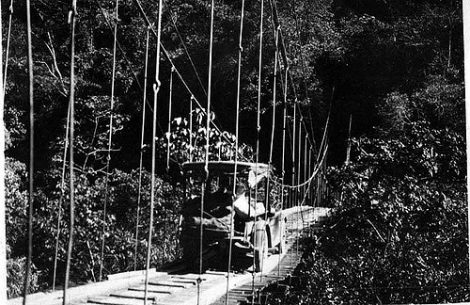
“Automobile crossing rope bridge. 1923.” Photograph made accessible by the Field Museum Library. http://www.flickr.com/photos/field_museum_library/4462494439/
On occasion, supporting the digital humanities can feel an awful lot like trying to drive a car across a rope bridge. Either the infrastructure is inadequate for the project, or the project chose the wrong infrastructure to use to get across the river.
In an attempt to avoid this unfortunately pairing of project and infrastructure as much as possible, we propose thinking carefully about the infrastructure we put into place, and also about how to communicate clearly with researchers and with ourselves. We want researchers to find and use the right resources for the job, and we want to prevent siloed services that may duplicate effort or cause turf wars. And one way to think through these issues is to map out what’s happening on your campus.
Most campuses will have brave DIY-ers, who cross the river in daring ways using found objects (fallen logs) or special skill/access (base jumpers). These are important parts of creative research on our campuses, but they are not very repeatable or scaleable. They are not a great plan for a support model.
“Simple cable ferry, Gee’s Bend, Alabama, 1939” by Marion Post Wolcott. https://en.wikipedia.org/wiki/Cable_ferry#/media/File:Marion_Post_Wolcott_- _Old_cable_ferry_between_Camden_and_Gees_Bend,_Alabama.jpg
One of the low-barrier, low-overhead, repeatable methods of crossing might be a rope ferry. These work quite well either solo or with a ferryman, but they may not be terribly stable over time. Perhaps various semi-ephemeral things like free blogs or social media fit here, where researchers can get information up online, but it may not be stable over time if the researcher or the service move in new directions.
“Venezia – Ferry-boat Lido di Venezia” https://commons.wikimedia.org/wiki/File:Venezia_-_Ferry-boat_Lido_di_Venezia.jpg
Or perhaps there are more modern ferries available. These are larger, more powerful, and require less effort on the part of the researcher. Maybe something like an institutional subscription to Omeka or WordPress fit here. They were for a lot of people interested in doing a lot of different kinds of things, and support can be pretty standard on campus.
But if you have a ferry running the same route over and over and over, and if you also have some money and staff for new construction, maybe it’s time to build a bridge. Some schools, for example, have a whole unit or a Center dedicated to supporting digital humanities. Some of these Centers are even iconic, like the Brooklyn Bridge. And I think that depending on the school, a massive, multi-lane bridge with tons of on-ramps and off-ramps might be a wonderful thing.
However, bridges really do require upkeep, they can become bottlenecks, they often have height and weight restrictions, and they may not serve all needs. Researchers are creative beings who may need to start in a different spot, end in a different spot, or get across in unusual ways. So at this point it becomes a matter of project portfolio management.
Vinopal, Jennifer, and Monica McCormick. ‘Supporting Digital Scholarship in Research Libraries: Scalability and Sustainability.’ Journal of Library Administration 53, no.1 (January 1, 2013): 27-42. doi:10.1080/01930826.2013.756689.
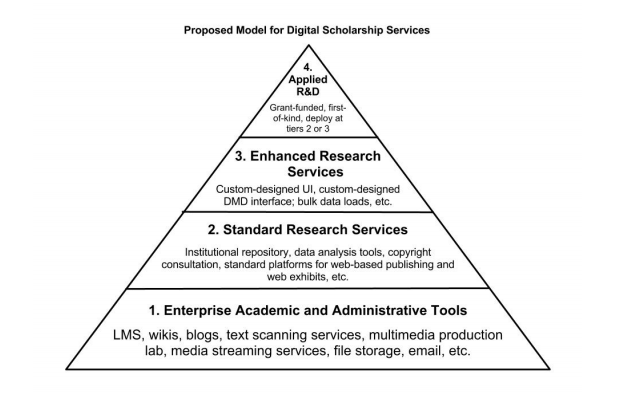
Jennifer Vinopal (who was also this conference’s keynote speaker, though we’d planned to site her even before we knew that), and her colleague Monica McCormick wrote a fantastic piece on “Supporting Digital Scholarship in Research Libraries: Scalability and Sustainability” in the Journal of Library Administration. In it they recommend having an infrastructure such that the majority of project can use standardized tools that are well-supported on campus. Then allow for creativity by building in support for projects that can mostly use those standard tools but with some standardized consultation services, or with a bit of custom tweaking. But reserve some capacity for a few truly custom projects that will require a lot of support (and try to make sure that these project can be “first of a kind” rather than truly one-off projects). So perhaps you have a couple of docks for some ferries not far from your bridge, or a landing area for your base jumpers, but there’s communication and vetting involved in committing resources to these special projects.
And no matter your solution, close communication between support and coordination folks will prevent boating collisions, or the building of duplicate bridges. To mix metaphors quite wildly, at Carleton we think of our coordinating folks as a three-legged stool: Library, Humanities Center, and Academic Technology. Representatives from these areas try to make sure that things move forward in a coordinated fashion even when the actual support and work of digital scholarship happens in all kinds of places on campus. We’re calling it a “coordinated distributed model,” and it is still in its infancy. We are currently tackling the question of what infrastructure to build and for whom, which tools will be our standard and which will we cut loose, who will be involved and to what extent, and how will we make sure that people who need us will find us?
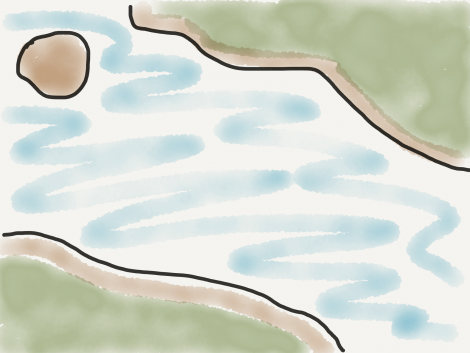
Exploring these questions, we handed out blank maps to participants and asked them to depict their campus’ current models, talking in small groups about how things work on their campuses, and comparing with others to find trends and themes.
Feel free to use this map or make your own. I just drew this sketch of a map on my iPad. https://drive.google.com/a/carleton.edu/file/d/0B1hW_xoemoVvSklzYmJTNnFzWTA/view
One fascinating thing was that there were three participants from one college, and all three drew different maps. Others drew people drowning in the river, or people standing on one shore and gazing longingly at the distant shore. But one thing that became clear was that whatever infrastructure an institution adopts, it has to fit the local context. There’s no sense sinking a ton of money in a massive bridge if there’s no demand, or just because another school did it. And on the other hand there’s no sense leaving researchers to fend for themselves on campuses where lots of people have a similar need.
Then we handed out new blank maps and asked participants to think about an ideal infrastructure for their campuses over the next 5-ish years. There were so many interesting and useful responses. One person drew a crew of happy inner-tubers (beer implied), and someone at a different table drew one big inner tube. Most had more than one method of getting across. Others had thought about setting up villages or resorts on one side or the other to show the community that would be important, or close communication, or the bringing together of units that are currently separate. The creativity and thoughtfulness in the room was so inspiring!
At the end we asked participants what one thing they wanted to take back or change first at their institutions. My own answer was that I want to hand out blank maps to the people I work with on campus and see what we each think the current model looks like, and where we each hope it might go.