Skip to content

Month: November 2006

Catalog Enhancement: The Struggle Continues

I’m a member of the Public Access Working Group (PAWG, which rhymes with frog, tee hee hee) comprised of members from both Carleton and St. Olaf. We’re in charge of making decisions about our shared catalog, and among other things, PAWG has been working on two decisions this year: whether or not to upgrade to Innovative’s WebPac Pro catalog interface, and whether or not to include “record enhancement” in the form of book cover images from Amazon.

The WebPac Pro decision proved to be easier than we thought. Turns out, the ranking algorithm for it’s much-touted relevance ranking stinks. If any of you are making this decision right now, try searching for the keywords Global Warming. You should notice that even though there are some books that have this exact phrase as a subject heading, they get buried pages and pages down your result list unless the exact phrase “global warming” appears in the title. No kidding. Effectively, the default search is a keyword in title search. Now, you can get around this if you put quotation marks around each word (i.e. “global” “warming”), which deactivates the relevance ranking altogether, but there’s no way I’m going to start teaching that in my instruction sessions. So we’re not “upgrading.”

But the more interesting decision is yet to come. Will we include book cover images from Amazon in our catalog? I’ve heard a lot recently about the benefits of allowing one-click access to book reviews, and I’ve heard that our students are used to seeing images on web pages, and I’ve heard that we should do our best to make the experience of searching the catalog as enjoyable and visually interesting as we can. I agree with all of these arguments. Absolutely. After all, as librarians we’re supposed to aid in locating, collocating, and making decisions, right? And book reviews and book covers both move us in the direction of making decisions much more effectively than, say, the height of the book’s spine in centimeters.

But I think our students are used to much more than pretty pictures. They’re used to everything on a screen being clickable, and everything doing something meaningful and more or less useful. Imagine what you would think if you saw an image to the left of a title in a result list. You’d click on the image, right? I would. And I’d get sucked to Amazon. Talk about mixed signals.

Now, I would realize that this wasn’t what I wanted or what was expected of me, and I’d hit the nice little “back” button in the browser and click on titles from then on. But my co-workers and I have noticed a distinct trend among our students. Instead of using our A to Z list to see if we subscribe to a journal or magazine, they find the publisher’s web site. Then they come to us and ask, in all seriousness, if the library has a fund that will help them buy this article online. They’re usually very happy when we point out the A to Z list. But last week one poor kid came back to me after he’d verified that we did not, in fact, subscribe to his journal and wondered if now I’d help him pay for it from the publisher’s site. That lucky kid learned about the A to Z list and interlibrary loan all in one evening.

These students who expect to be able to do whatever it is that site they land on tells them to do. What’s more, they expect that we expect them to do these things. The web isn’t just about seeing things; it’s about doing things. And if we put something in front of our students that implies they should do something that we don’t actually want them to do, that’s a problem.

Of course, we could by images from places like Syndetic Solutions, but that’s expensive. Still, this would be a way to make our records look pretty without threatening mass confusion.

So the upshot of all of this is that I’m willing to be convinced, but I have grave reservations about the amazon solution to our boring catalog. If we’re really interested in providing what users are used to, we’d have to redesign everything, not just slap on some pretty pictures. And that “everything” would have to include all sorts of clickable and interactable options.

But in the spirit of being convinced, is anyone willing to share their experience with the amazon lipstick option? I’m particularly interested if you have any statistics to show how often those images get clicked on. Do your ILL stats change?

Just as a side note, we’re also pondering how best to configure our link resolver… To offer choices of electronic options or not to offer choices, that is the question. Whether ’tis nobler to privilege one-click access to beauteous PDF full text or to deepen the understanding of young minds as they develop access preferences from among the panoply of database options. To learn, perchance to dream. To dream of other uses to which they can put databases that appear often in their list of options….

Sorry Will. You’re writing was a lot better, and certainly more moving.

Technorati tags: ,

5 Comments

Bundled Collections

A question was implied during my library’s recent exploration of the functions and implications of a catalog that actually works as a discovery system. It came up during the hour-long question and answer period with Roy Tennant (have I mentioned what a good idea it was to set aside that much time for questions?!?) when he made the comment that we should build the search skills of reference librarians into the catalog interface. That’s great, but then what will reference librarians do?

I’ll tell you what we’ll do. We’ll have time to coach students in more than keyword searching, we’ll be able to explore the exploding realm of quality, authoritative information available online, and we’ll be able to develop ways of feeding this rich content to our users when they need it. “Googling” things is great, but as more and more information gets uploaded for public consumption, the relevant hits will become increasingly diluted in a sea of irrelevant hits. This means that we’ll have to teach better search strategies for web search engines, and we’ll have to develop tools that will help our users get to the information they need. We’ll also have to spend more and more time teaching students to distinguish between the useful and the bogus in their result lists.

People are already creating tools to aid in the quest for authoritative information. The first one that springs to mind is, of course, the Librarian’s Internet Index. But on a much smaller scale, librarians are beginning to create rich troves of web-based sources using del.icio.us, Furl, and now Google Custom Search Engine.

I adopted del.icio.us earlier this year and have decided to make mine first and foremost a curricular collection that will be useful to students in my liaison areas as well as to students on our campus in general (you can see my account here). It’s still a growing collection, but it’s a great place for me to “remember” the image repositories I find while helping one student with her research, the web sites I choose for students in a class on globalization, and so on.

But I have high hopes for tools like the Google Custom Search Engine. This is what reference librarians could do with all the “free” time gained from not helping students navigate the catalog. (And I’ll believe in the theory that we’d have free time when I see evidence of it… but that’s another whole topic.) A few other bloggers have noted some of the bundled searches that are being developed already. And now there’s a budding directory of GoogleCSE forms here. I’m also keeping track of any custom search forms that look particularly useful to the library world and adding them to my del.icio.us account. So far, here’s what I’ve found:

I still haven’t ventured into the water myself, but I think it’s only a matter of time before I start creating custom search portals that I know will return authoritative information to my students. I think one of our directives in the coming years will be “go forth and bundle” because without it our poor users will stumble around in an increasingly expansive conglomeration of more-or-less random information.

Technorati tags: , , , , ,

2 Comments

The Reference Desk Under Fire

Every so often, I hear variations on the theme of “Why sit behind a reference desk? What are you — scared of the students?” I’ve heard everything from wearing uniforms so that we’d be recognizable while we were “out doing our work in the stacks,” to carrying a cell phone, to simply “walking around” and being available. I’ve heard eloquent deconstructions of the barriers we put between ourselves and the students when we sit at a reference desk. And I’ve sensed unspoken assumptions that if we’re “just sitting there” we aren’t actually busy or working.

Now, I completely agree that desks can pose barriers, especially when they’re the podium type that raises the librarian on high and requires timid students to crane their necks just to see us. I am also a huge proponent of making myself not only be available and approachable, but also seem available and approachable. Not only that, but I’ve seen wonderful and creative examples from other institutions who have abandoned their desks altogether.


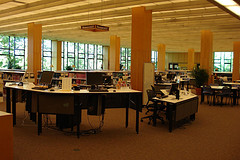
Why, then, do I steadfastly argue for my desk shift? Because I can’t think of any way to make myself be or seem more available and approachable to my user population. Of course, our particular desk configuration helps. We sit at a very low desk that is no more substantial than any of the work tables in the reference area (and it’s on wheels, though we haven’t moved it in a while). We also have a chair next to us for students to sit in while we work with them. We’re also directly across from both of the public printers for the main floor of the library and right next to the main floor’s computer area (which is in this room and just off the upper right side of my picture).

But simply having a non-scary desk in the highest-traffic area of the busiest building on campus isn’t enough (though it helps). That simply means that we’re visible, not that we’re approachable. Rather, having a predictable place where we can be found at predictable times, making the most efficient use of space in our somewhat unwieldy library, and playing off of the culture of our campus all contribute to my sense that our desk, or something like it, is necessary.

The physical library space needs little elaboration. There is simply very little space for anything other than books on the lower three floors of the library (remember, people enter our library on the fourth floor and work their way down). Not only that, but there’s no predictable traffic pattern on the lower floors, and the discussions that happen at the desk would disrupt the quiet levels on the lower floors. Of course the argument could made (and has, in fact, been made) that we would simply walking around down there, so traffic patterns and, to some extent, noise levels needn’t be an issue. But the fact is that the other librarians and I are rarely called upon to do work that would involve wandering in and out of the stacks. We go there to collect books in preparation for our classes, or with students when we’re in the midst of an appointment or reference interaction. But that’s about it. Then there’s the problem of the computer. Most questions need at least some computer interaction, and the computers in the library are usually all in use by students. It’s far easier to know that while librarians may be wandering around, there’s also one who’s scheduled to be either at the desk or who will be returning to the desk shortly.

No, the strongest argument in favor of the desk as a physical, predictable, and intuitive space lies in customer service. There’s nothing more frustrating than wandering 4 floors without any long sight-lines, looking in and out of stacks, climbing up and down 6 stair cases, just trying to find somebody who can answer a question.

What’s more, the librarians function in an analogous way to professors when we sit at the desk. Just as students can make appointments with their professors but can just drop in during office hours, they can also make appointments with us or simply drop in on our desk hours. Culturally, this meshes well with campus culture and student expectations.

I’ve wondered for over a year now if I’m simply defensive and stuck in the mud when I baulk at challenges to our service model. But I’ve come to the conclusion that there are very good reasons for having a reference desk, as long as that desk is positioned and designed with approachability and usability in mind, and as long as the people sitting at the desk make sure to look up, take their hands away from the keyboard, and smile whenever they’re approached. After all, approachability has at least as much to do with the person as it does with the furniture.

Technorati tags: , ,

4 Comments

Cooking

I love to cook, and I love to take pictures. So lately I’ve begun documenting some of my cooking. I already have a pea soup recipe here, and tonight I made a spicy chicken stir fry. Think of it like a cooking show without the annoying talking… and not moving. So it’s really nothing like a cooking show. It’s more like a cookbook with all the steps pictured… and only two recipes in it. Hmmm. So think of it as me having fun with my camera. That fits much better.

2 Comments