Skip to content

Pegasus Librarian Posts

The Lego Age

I was at Paul Miller’s session at CIL where he made the now-famous analogy between new web services and legos. Specifically, he was talking about the ways in which new web applications are made with whole sets of loosely associated and interchangeable bits. (Think Firefox and its extensions.) This theme was applied specifically to ILS vendors in a recent discussion of the Library 2.0 Gang (Thomas Brevik, Michael Casy, Dave Errington, Paul Miller, Michael Stephens, and Richard Wallace). Wouldn’t it be cool if there were a base ILS model onto which you could pile as many or as few “extensions” as you wanted?

Say you wanted RSS functionality, or AJAX pre-searching, or a mashup that would show users the exact locations of their books in the stacks. All you’d have to do is download those extensions. (And by the way, there are catalogs out there that have done each of these things.)

So maybe when we’re talking with vendors we shouldn’t be asking “what features does your ILS have?” Maybe we should be asking who’s developing the plug-ins or add-ons or extensions, where the user forum for suggestions and questions is, and which of the developers have blogs.

(This Library 2.0 Gang also expressed quite a bit of interest in the upcoming Internet Librarian conferences, both the one in California and the one in London. They’re also interested in developing “Conference 2.0” and in the book Ambient Findability.)

Comments closed
Course Management Systems — decisions, decisions

My school is currently evaluating two course management systems, Moodle and Sakai. I haven’t worked here very long, only about 9 months, which is apparently about 2 years less than the amount of time they’ve spent thinking about these course management systems. Last term, we finally did a side-by-side comparison of the two systems by having a handful of faculty use each (the faculty got to choose which to use) and then surveying those faculty and their students.

Today, the IT staff, members of the web development team, and librarians met to discuss the survey results, decide what other studies need to be done, and plan for a presentation to the faculty at the end of the term which will announce the winner of this little contest and explain the rational for our choice. What we decided was that we have a lot more studying to do. It turns out we’re comparing a course management system with an “interoperability platform” which can also be used as a course management system. And therein lies the rub. Do we want a system that is a pretty slick (though not perfect) CMS, or do we want to back a system that has potential to be something that it isn’t yet: a comprehensive collaboration and communication system.

As usual, nuts-and-bolts decisions force us to struggle with our goals, priorities, philosophies, and hopes. Philosophy and practicality are proved, yet again, to be inseparable.

Comments closed

EverNote


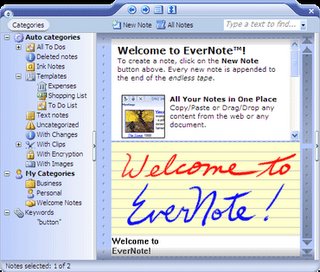
EverNote is cool. I downloaded it in January thinking it might be cool or useful, but pretty sure it was more my inner geek taking over than anything else that prompted me to try it out. Well, I was wrong.

Remember when you got your very first microwave (my family was a very late adopter, so I really do remember my family’s first microwave)? Remember how you thought it might be useful on rare occasions? Remember how within a matter of days you couldn’t even remember life without one? Well, that’s what this has been for me. I now have it open on my computer at all times. I plan all my classes on it. I write my follow-up notes on what went well and what went poorly in my classes on it. I keep track of what I’ve tried and what I’ve found when working on really hard reference questions. And (as many CIL-ers know) I take copious notes at conferences and meetings into it. (People think I’m being “cool” or “hip,” but the reality is that I just can’t remember things I hear at meetings, so I have to take notes.)

I love EverNote. It lets me assign multiple categories to notes (which is much better than putting notes into folders), and I get to make up my own categories. It also lets me keyword search all my notes. It also comes with a “web clipper” that you can click and it’ll import selected parts or all of the web page you’re viewing at the moment into a new note. There are, however, a few things it doesn’t do that it absolutely should do.

  • It doesn’t work on a Mac, so I can’t use it at our reference desk.
  • It isn’t web based, so I can’t access it from all of the many computers I use all day.
  • It doesn’t sync, so you actually have to export from, say, your desktop computer to a flash disk and import into the database living on your laptop. To move back, you have to do all this in reverse. This requires that you remember to update your database on whichever computer you’re using at the moment before taking new notes so that you guard against overwriting old notes that you’ve edited.

But these lacks will (hopefully) be remedied in future upgrades. There’s a highly active user forum, and the developers spend a lot of time participating in the forum. Oh, and did I mention that it’s FREE.

Comments closed

Academic Librarians vs Academia?

Two seemingly unrelated events converged to create a clearer picture of what academic librarians are facing these days. One was a stimulating and enlightening meeting with the Twin Cities Writing Professionals group last Friday. At this meeting, members of the group and the librarians they had invited to join them for a day all began to realize that we’re working with students on the same general skills (thinking critically, reading critically, evaluating what you’ve read, and communicating well). But that’s a topic for another evening. The moment of realization came for me when one writing professional attempted to articulate the difference between writing professionals and librarians by saying,

It seems to me that we’re both trying to help students toward good writing, but while writing professionals believe in providing guidance but not answers, librarians are trained to deliver answers to questions.

Needless to say, this provoked quite a bit of lively discussion. I don’t know of a single academic librarian who strives to do his or her students’ homework for them!

The second event occurred today when I attended the presentations given by senior French majors at my campus who had just completed a year-long project (their senior thesis or, as we call them here, “comps”). As I listened to the three girls present on reconciling traditional vs colonized marital arrangements in Madagascar, the French health care system, and stereotypes of “youth” and those riot-ridden “suburbs” in France, it struck me that “successful” comps talks problematize more than they clarify. In academia, we are suspicious of anything that seems to “answer the question” too clearly, too neatly.

So here’s what librarians face on college campuses today: a general conception that we “answer” questions, and a culture that regards finding answers as the cheap and easy way out, as naive, or even as cheating.

3 Comments