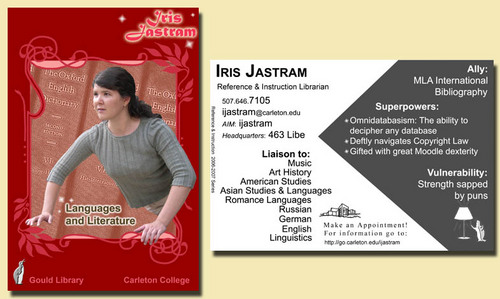

At long last, we’ve had time to put images of our new trading cards up online. You can see all of them here.
Learning in Libraries and Loving It
At long last, we’ve had time to put images of our new trading cards up online. You can see all of them here.
I’ve heard from people who want to know what our library has on it’s “Watch List,” so I thought I’d post them here.
But first, a little bit of the back story. If you remember, at the end of last year we had a series of surprisingly interesting and stimulating meetings about out library’s strategic plan (my posts about these meetings are here and here, and now a draft of the plan is available online as a pdf). Part of this plan involves watching trends and developments in the library world outside of our college. So each department made up a list of the things that they either are or would like to be watching, and then the full library staff met to pare the list down to those items that seemed interesting and important to the library as a whole and that meshed well with our strategic plan. Now we have a blog (visible only to library staff, and which I wrote about here) in which we track what we’re seeing, and we use WordPress’ category function to label each post according to the watch list item or items it covers. We can also use the blog space to suggest new items for the watch list, or to discuss taking items off the main list if those topics have stopped being of interest.
And here’s what we’re watching.
Collections:
Electronic, new and emerging formats:
Access to our collections:
Services:
Digitization:
Equipment (hardware & software):
Space:
Campus Initiatives:
Other:
So… I’m thinking of listening to some podcasts. What good ones are out there? I’ve got the SirsiDynix Institute and Talking with Talis. What else should I be listening to? Or should I come to terms with the fact that I don’t have time… No, that doesn’t sound like fun. ;P
2 CommentsUp until this year, librarians have made little tick marks on a grid to indicate questions answered at the reference desk. We had a new grid every day, and we could tick off how many short questions and long questions we answered every hour, as well as how many questions we’d solved jointly with the IT help people, and how many questions we simply referred to the IT people (I’ll write more about our IT help later, but for now suffice it to say that we have joint service point in the library). I hate to think how much time was put into compiling these paper tick marks each week.
But this year, we’ve beefed up our statistics. In fact, it’s becoming much more than a statistics-collection project. We’re building a knowledge base and learning from our co-workers’ reference interactions.
How are we doing all this? We’re using LibStats, a free, open-source, PHP/SQL database designed by library people at the University of Wisconsin, Madison. This term, we’re using the default install which is perfect for reference interactions either at one location or multiple locations. We had grand plans of customizing the install to allow us to track our instruction and appointment statistics and notes, but we ended up simply taking the default settings so that we could get the system up and running in one day. (Seriously, it didn’t take more than a few hours to set up and get the minor field customizations entered. We got our web team to install the database, and then told the system what values to include for things like “patron type” and “question type.”)
Check out the demo, if you want to play around, but here’s a little run-down of what it does and what I like. You can specify location, patron type, question type, time spent, and librarian VERY easily. Then you can either click “Save Question” or you can type in the question and the answer before saving. You can also go back and change saved questions, backdate them, or add comments. (We use this to help each other out with questions, build in more complete answers, and so on.) We also each initial our questions, which helps with follow up. (It also means that you can filter to see how many questions you have answered this week, which is fun.)
My favorite feature, other than how completely easy it is to use, is that the database remembers your settings so that, for example, when I’m in my office and want to enter an email question I got, I open the database and it remembers that last time I worked from this computer I was in my office, so that location code is already selected for me and my initials are already suggested for me. Or if I go out to the reference desk, I don’t have to specify “Reference Desk” as a location because it remembers that from the last time that computer was used. It remembers all the values you specify, simply adding a date/time stamp to each entry whenever you click “save.” This drastically reduces the necessary clicks.
You can also search questions by keyword, and this is where the knowledge-base comes into the picture. Our database is only 5 weeks old, but already I can search to find passwords to things or for answers to those questions where you know the answer is right under your nose but you can’t think of it. We can also mark trends in questions, so it’s easier for liaisons to get in contact with their professors and say, “hey, we’re seeing a lot of questions about your numerical essay assignment.”
I can’t speak for my co-workers, but I know that this has helped me keep track of things like the questions I get at home or in my office via email. Now I can access the database from anywhere and just enter my question and answer. No more remembering to run out to the desk and make those little tick marks. And we’re hoping to do some database customization over winter break that would allow us to check a box saying that the question still needs attention, which would allow us to flag questions needing follow up, or use the system more like a trouble/ticket system.
Oh, and you can do queries and reports (there are some default reports, but for everything else you’d need to know SQL), or you can do a data dump into Excel and play with data to your heart’s content.
5 Comments