
Skip to content

Pegasus Librarian Posts

Moodle, One Year Later

Tomorrow I’m joining a panel made up of me, our resident web-app coder guru, a faculty member, and academic technologist, and a student to talk about how things have changed one year into our adoption of Moodle as our campus’ course management system. We’re presenting this as the first of the term’s LTC lunches (generally a weekly gathering at which someone or some group presents on a topic relevant to learning and teaching while the audience munches away). I’ve only presented at two other LTC events, so I’m a little nervous, but apparently not nervous enough to have carved time out of the last week to actually prepare. I mean, I’ve thought about it a little bit, but not actually prepared.

And now, tonight, I find myself a little on the burned out side. Fall term is just not a good time for sustained or creative thinking. Fall term is a time to put out fires as quickly as possible and not look back. So, sitting here, thinking to myself how much I’d prefer reading or writing blog posts to planning this 8 minute spiel, it suddenly occurred to me that I could con myself into preparing for tomorrow if I wrote it up as a blog post!

So, here are my thoughts about how Moodle has affected the library, one year into implementation:

Moodle and Teaching

  • Preparing for classes: For those classes where the instructor makes use of Moodle, we librarians can now supplement the information the professor gives us about the class with direct observation of the readings students have been assigned, the context into which our sessions fall, and even the over-arching themes and questions that are important to the class. There are a lot of ways to tie our sessions to the course content, with the goal that they will interrupt the flow of the course content as little as possible. Everything from the examples we pick to the discussions we lead to the actual content of our sessions can be tailored to fit into the themes and goals of the course. When this happens, library sessions can actually augment rather than simply supplement course content.
  • Class logistics: Moodle makes it easy to find the exact course title, the number of students enrolled, and what students have been told about where to meet us, and other such useful information. I’ve also been able to compare lists of registered students to see if any in next week’s class already heard me speak last week. And if so, I work extra hard to make sure they’ll get as much out of the second session as they did out of the first.
  • Interacting with Students: Including contact information on a course’s sidebar (now made easier due to some custom coding which allows professors to simply turn on their librarian’s contact information), setting up shop in a class’ forum, or (though this hasn’t been tried) joining the class’ skype buddy list are all good ways of meeting our students where they are when they’re doing their assignments. Now, if I could just get my MeeboMe widget in there… but that’s probably asking a lot.

Moodle and My Other Work

  • Hey look, it’s an easy intranet! Whether it’s collecting useful information and links or hosting departmental discussions and schedules, Moodle has offered an easy way to set up quick and dirty intranets. The liaisons have one, the Library Leadership Group has one, the SCIC workers have one… and that means that we can manage our work easily. It’s made the biggest difference in the case of the SCIC site because now the SCIC students and the librarians they work with all have a common place to communicate, norm our expectations, and gather information.
  • Working with librarians at St. Olaf: Since we share a catalog but do not share network space, we and the St. Olaf librarians really benefit from an online space where we can house our meeting minutes, operational records, and other such useful stuff.
  • Project Management: We’re using our Moodle spaces to manage fairly complex projects. Not only are all the standard features (forums, places to keep documents, wikis, calendars, etc) important, but a couple of less standard features have come in very useful. One example is our newly formed eResources group. They’ve realized that very few people in the library operate with the same terminology when they’re thinking and talking about eResources, so one of their first projects this year is to create and define a uniform eResources vocabulary. To do this, they’re using Moodle’s glossary feature. They’ve divided the key terms among themselves, assigning themselves those terms in the glossary by categorizing the glossary entries according to their initials. And once the terms are defined, anywhere they’re used in that Moodle site they’ll appear highlighted with available definitions if you hover over the word.

So I think that’s what I’m going to talk about tomorrow, unless inspiration hits at the 11th hour. It seems like a representative sampling of the key ways that Moodle has impacted our librarian-ish existences in the past year.

2 Comments
Managing My Bookmark Toolbar

Like most people, I keep a variety of bookmarks and bookmarklets on my browser’s bookmarks toolbar. But ever since sites started associating cute little icons with their URLs, I’ve developed a kind of complicated method of managing this toolbar. You see, I’m an icon kind of a gal. My eye gravitates towards the cute picture rather than the words describing it.

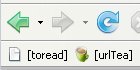
The problem? Most bookmarklets don’t come with an icon. So you just get the little blank piece of paper and some practically useless words (like the “toread” bookmarklet in this image).

So here’s my multi-step process. Bookmark the website associated with the bookmarklet (in the case of my urlTea bookmarklet I bookmarked urltea.com). Then click on your new bookmark so that it gathers the proper icon from the site and looks all pretty. Meanwhile, drag the bookmarklet to the toolbar. (Ok, I know you can’t do this “meanwhile,” but it sounded good.) Now view the properties of the bookmarklet, copy the javascript in the “location” box, and then paste it into the “location” box of the now-former bookmark to the site. Now you can delete the un-beautiful bookmarklet because, well, you don’t need two bookmarklets, do you?

My last step is to enclose the names of my bookmarklets in square brackets. This way I can tell at a glance which buttons do something and which are simply bookmarks.

Comments closed

The Problem of Literary Research

Two years into being a lit librarian (as well as 6 years of studying literature and writing literary criticism of various sorts and levels), I finally realized what makes literary research so hard. All these poor students are looking for research about their literary works, and they want examples of criticism that approach those works from particular theoretical frameworks. But the MLA International Bibliography and other databases for literary research don’t index by theoretical perspective. I can’t ask it for New Historicist readings of Daisy Miller, for example. And because of this I can’t easily figure out quite what New Historicism is, or who the key scholars were/are, or flesh out a “history of criticism on this piece” kind of literature review.

And I can understand why this is the case. I mean, can you imagine the overhead involved in making decisions about what theory/theories are represented in an article, applying this to a databases as massive as the MLA International Bibliography, or updating the constantly changing terminology associated with literary theory? And yet, this is one of the three primary query-types I’m asked to help with (the other two being “things interpreting this work” and “things characterizing this author.”)

It strikes me that this could be one of those perfect uses for social tagging in research databases. But until then, these poor students are in for a long and frustrating stint of following up on citations, using Web of Knowledge to develop a better feel for the network of scholars writing from a particular theoretical framework, and generally having to move beyond the now-normal task of picking articles with interesting titles from result lists.

In other words, I think that in many ways, the skills required for good literary research are still some of the least translatable into the electronic world. And these skills will probably continue to be much more based on building up vast internal schemata of authors and publishers then on boolean searching until a) databases add indexing about theoretical frameworks or b) MLA (and others) goes social and let us help them describe these works of criticism in ways that are useful to literary critics.

Comments closed

Anyone Want to Come Work With Me?

The seven of us in the Reference & Instruction department are thrilled with the idea that soon we will be eight! Here’s the ad (and here):

Purpose of this Position:

Carleton College seeks an innovative and energetic librarian to join us in our lively and imaginative program of information resources and services. This new full-time position will increase our support of the social sciences from 1.0 FTE to 2.0 FTE. This is an ideal position for an individual who is 1) looking for an opportunity to work in an institution focused on teaching, in collaboration with an unusually fine group of students, faculty, and colleagues; 2) committed to excellence in teaching; and 3) deeply rooted in and excited about a social sciences discipline. The Reference and Instruction Librarian for the Social Sciences will report to the Head of Reference and Instruction.

Responsibilities:

  • Work closely with current liaison to expand support to faculty and students in social sciences. See: http://www.carleton.edu/campus/library/reference/liaisons.html.
  • Assist in information literacy planning, teaching, development, and instruction.
  • Participate in a well-utilized individual student appointment model.
  • Participate in our Research/IT desk service.

All members of the team participate in campus initiatives and faculty development presentations, evening and weekend reference rotation, and reference collection development. Liaisons also work together on user guide design and development, production of handouts and publications, and quirky publicity activities. We are committed to collaborating with IT and other academic support units.

Carleton College is a highly selective, residential, liberal arts college located about 45 miles south of Minneapolis and St. Paul. The Gould Library (http://www.carleton.edu/campus/library) strongly encourages and supports professional development, initiative, and imaginative approaches to information services. We place a high value on a solid grounding in the world of books and scholarly information.

Minimum Qualifications:

Required:

  • ALA-accredited MLS or equivalent.
  • Strong service orientation, initiative, and flexibility.
  • The desire and ability to work both independently and as a part of a collaborative, decision-making team.
  • Excellent interpersonal skills.
  • Outstanding oral and written communication skills.
  • Strong teaching skills.

Preferred:

  • Academic library experience, including reference and teaching experience.
  • Strong interest in, knowledge, or experience in assessing user needs.
  • Intrigued by uses of social software in libraries.
  • Advanced degree in the social sciences.

If interested, please send a letter of interest (including where you learned about this position), résumé, and three references complete with address, email, and phone numbers to Carleton College, Human Resources, One North College Street, Northfield, MN 55057. Application review begins October 22, 2007, and continues until the position is filled. Visit our web site at www.carleton.edu. Carleton College is an equal opportunity employer committed to excellence through diversity.

“Social Sciences” at our school means Economics, Education, International Relations, Political Economy, Political Science, and Sociology & Anthropology (a dual department here).

So… who wants to come work with me?

Comments closed