Skip to content

Category: Tools and Technology

Collections of Collections

Life and work and crazy deadlines on massive projects have all been ganging up on me lately to keep me from posting (or cooking, or doing my dishes, or sleeping much, or… really anything that usually makes up the rhythm of my existence). The bad thing about this is that I’ve never felt quite this overwhelmed before (though it sure is making me look forward to having another librarian join our team!). The good thing is that when so many things happen in such a short space of time, I can see patterns in the kinds of confusion my students face much more easily.

One such typical confusion that’s been brought to the fore in the last couple of weeks has to do with the concept of collections of collections. We deal with this concept all the time in libraries, and in academia in general. We know without thinking that special collections, archives, government documents, journal collections, and teaching collections in individual departments all have their own internal coherence. They have their own rules about what constitutes a relevant description and what doesn’t, what finding aids make sense, and what physical or digital organization makes finding and using the information hum along smoothly. Who would use the world “Carleton” to describe anything held in our archives like they would in our regular book collection? And who would organize our regular books by publisher like they do in gov docs, kind of?

Take that a step further and look at all our bibliographic databases. Some are indexing only (like MLA International Bibliography). Some include abstracts. Some search the full text of the article. Some ONLY search the full text of the article. No matter their structure and search philosophy (because I do think choice of primary access comes down to philosophy most of the time), each database has it’s own internal rhythms and vocabularies, strengths and eccentricities. We’re very used to approaching each new collection, probing it for clues to its vocabularies and strengths, and then mining it for insights into our research problems.

And this is just the way it is. (And incidentally, this is what makes federated search such a bear of a concept… but more on that later, maybe.) We are used to this state of affairs and navigate it as easily as we change our wardrobes to fit new seasons. Which is why, when we encounter digitized collections online, we don’t even blink. Of course they’ll have their own internal rhythms. Of course they’ll resonate to their own vocabularies.

But this isn’t the way the search-engine optimized web works. The new default order of things is that for any given search box to search everything under it in exactly the same way with consistent results. (I know, I know. This isn’t how it actually happens. But it is what people think happens, which is more to the point.) So faced with a portal like, for example, American Memory, what are students to think but that entering search terms in that little search box will search through all of the content and bring back relevance-ranked results? And yet, American Memory is a collection of collections, just like our library here on campus is a collection of collections. That search box is almost entirely useless and is causing students no end of frustration. They see result lists that are either 0 or 9 bazillion, and both results bother them so much that they’ve been coming the reference desk in droves to find out what they’re doing wrong. They’re confused and frustrated, and they absolutely “know” that the fault lies with their search abilities rather than with the problem of having a cute little search box that is desperately trying to search the contents of hundreds of collections that have about as much in common as Medline and the MLA International Bibliography, or as our musical recordings and our map collection. Up until this point in their lives, Google has searched web pages for them and delivered understandable results. They’ve never before had to consider the implications and complications that discrete collections present.

(Oh, and in case you’re wondering, explaining the concept of collections of collections, and explaining how to use the cute little search box to find collections rather than items has relieved frustration so far.)

1 Comment

The Curse of Controlled Vocabulary

Yesterday, as students filed in and out of my office in a continuous stream, two of them asked questions that made me thank my lucky stars I’d taken that elective cataloging and classification course back in library school. Without it, I would have been mostly stumped yesterday.

Here’s why. Not only did the experience of taking cataloging and classification force me to realize that I’m geeky enough to get a kick out of AACR2 and mapping it to MARC, but I also learned that I’m very very bad at classification. It’s not that I can’t figure out what books are about…most of the time. I just could never reconcile myself to the idea that, because of the historical need to save space on those catalog cards or print indexes, the rules for applying subject terms seem to inhibit that gathering function that Cutter listed among his 3 primary objectives for the catalog. (For my non-librarian friends, these objectives are: allowing people to locate particular books, help them gather together related items, and help them make informed decisions about what they want.) Specifically, the problem lies in the rule that states that if you have a hierarchically related set of subject terms, you must apply the most specific term that applies to the entire work. You may not also apply the broader terms higher up the hierarchical structure. Similarly, if two or more of the more specific terms apply to your work, you cannot apply both. Instead, you have to look upward in the hierarchical structure until you reach a term that can apply to the entire work.

So what does this have to do with my appointments yesterday? Well, twice yesterday I had students come in frustrated and worried that their topics weren’t viable (and these were the topics for their senior theses, so they were a little stressed). They’d plunked terms into the MLA International Bibliography and only retrieved 2 or 3 hits! Here’s an example that’s an amalgam of a couple of students yesterday. Try finding articles on Elena Garro and gender in the MLA-IB. A good student will know to flip the author’s name around and search it as a subject. A good student will also find some synonyms for “gender” (which I won’t list here for fear of Google). This good student will get about 3 hits from MLA. Three hits?!? How can you write a thesis with this little to go on? And this from the database that’s custom-made for searching literary topics.

These students correctly assumed that more must have been written on the topic. And finally, after poking around for a while, we discovered that more people were writing about Garro’s work and some aspect of gender… specifically, either the male or female gender. This means that the indexers who saw articles about Garro’s portrayal of femininity could not also add the subject term “gender” because, remember, you can’t have both narrow and broad terms describing the same work. This means that students interested in gender have to include narrow and broad terms in their search. In a Google-safe example, if you replace “gender” with “women OR femininity OR gender OR manhood OR masculinity”OR “men” you suddenly get 42 results. And if we probed for other gender-related words, I’m sure we’d get even more results.

My two students had the same reaction when I explained this phenomenon: “What?!? Crazy! Why can’t they add the other terms?” Why indeed? We aren’t restricted by those 3×5 cards any more. We aren’t publishing the MLA-IB as a yearly print index any more. We’re simply adding relationships in a database.

I’m thankful to these two students for reminding me of what I’d learned back in my cataloging class. Now that I’ve been reminded, I’m planning to include discussion and examples of this phenomenon in my next instruction session, and probably in many of my sessions in the future. I bet my own searching skills will be greatly improved from now on, as well. Funny how it takes a real-life frustration to teach me what I should have known all along…

4 Comments

Moodle, One Year Later

Tomorrow I’m joining a panel made up of me, our resident web-app coder guru, a faculty member, and academic technologist, and a student to talk about how things have changed one year into our adoption of Moodle as our campus’ course management system. We’re presenting this as the first of the term’s LTC lunches (generally a weekly gathering at which someone or some group presents on a topic relevant to learning and teaching while the audience munches away). I’ve only presented at two other LTC events, so I’m a little nervous, but apparently not nervous enough to have carved time out of the last week to actually prepare. I mean, I’ve thought about it a little bit, but not actually prepared.

And now, tonight, I find myself a little on the burned out side. Fall term is just not a good time for sustained or creative thinking. Fall term is a time to put out fires as quickly as possible and not look back. So, sitting here, thinking to myself how much I’d prefer reading or writing blog posts to planning this 8 minute spiel, it suddenly occurred to me that I could con myself into preparing for tomorrow if I wrote it up as a blog post!

So, here are my thoughts about how Moodle has affected the library, one year into implementation:

Moodle and Teaching

  • Preparing for classes: For those classes where the instructor makes use of Moodle, we librarians can now supplement the information the professor gives us about the class with direct observation of the readings students have been assigned, the context into which our sessions fall, and even the over-arching themes and questions that are important to the class. There are a lot of ways to tie our sessions to the course content, with the goal that they will interrupt the flow of the course content as little as possible. Everything from the examples we pick to the discussions we lead to the actual content of our sessions can be tailored to fit into the themes and goals of the course. When this happens, library sessions can actually augment rather than simply supplement course content.
  • Class logistics: Moodle makes it easy to find the exact course title, the number of students enrolled, and what students have been told about where to meet us, and other such useful information. I’ve also been able to compare lists of registered students to see if any in next week’s class already heard me speak last week. And if so, I work extra hard to make sure they’ll get as much out of the second session as they did out of the first.
  • Interacting with Students: Including contact information on a course’s sidebar (now made easier due to some custom coding which allows professors to simply turn on their librarian’s contact information), setting up shop in a class’ forum, or (though this hasn’t been tried) joining the class’ skype buddy list are all good ways of meeting our students where they are when they’re doing their assignments. Now, if I could just get my MeeboMe widget in there… but that’s probably asking a lot.

Moodle and My Other Work

  • Hey look, it’s an easy intranet! Whether it’s collecting useful information and links or hosting departmental discussions and schedules, Moodle has offered an easy way to set up quick and dirty intranets. The liaisons have one, the Library Leadership Group has one, the SCIC workers have one… and that means that we can manage our work easily. It’s made the biggest difference in the case of the SCIC site because now the SCIC students and the librarians they work with all have a common place to communicate, norm our expectations, and gather information.
  • Working with librarians at St. Olaf: Since we share a catalog but do not share network space, we and the St. Olaf librarians really benefit from an online space where we can house our meeting minutes, operational records, and other such useful stuff.
  • Project Management: We’re using our Moodle spaces to manage fairly complex projects. Not only are all the standard features (forums, places to keep documents, wikis, calendars, etc) important, but a couple of less standard features have come in very useful. One example is our newly formed eResources group. They’ve realized that very few people in the library operate with the same terminology when they’re thinking and talking about eResources, so one of their first projects this year is to create and define a uniform eResources vocabulary. To do this, they’re using Moodle’s glossary feature. They’ve divided the key terms among themselves, assigning themselves those terms in the glossary by categorizing the glossary entries according to their initials. And once the terms are defined, anywhere they’re used in that Moodle site they’ll appear highlighted with available definitions if you hover over the word.

So I think that’s what I’m going to talk about tomorrow, unless inspiration hits at the 11th hour. It seems like a representative sampling of the key ways that Moodle has impacted our librarian-ish existences in the past year.

2 Comments

Managing My Bookmark Toolbar

Like most people, I keep a variety of bookmarks and bookmarklets on my browser’s bookmarks toolbar. But ever since sites started associating cute little icons with their URLs, I’ve developed a kind of complicated method of managing this toolbar. You see, I’m an icon kind of a gal. My eye gravitates towards the cute picture rather than the words describing it.

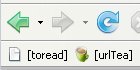
The problem? Most bookmarklets don’t come with an icon. So you just get the little blank piece of paper and some practically useless words (like the “toread” bookmarklet in this image).

So here’s my multi-step process. Bookmark the website associated with the bookmarklet (in the case of my urlTea bookmarklet I bookmarked urltea.com). Then click on your new bookmark so that it gathers the proper icon from the site and looks all pretty. Meanwhile, drag the bookmarklet to the toolbar. (Ok, I know you can’t do this “meanwhile,” but it sounded good.) Now view the properties of the bookmarklet, copy the javascript in the “location” box, and then paste it into the “location” box of the now-former bookmark to the site. Now you can delete the un-beautiful bookmarklet because, well, you don’t need two bookmarklets, do you?

My last step is to enclose the names of my bookmarklets in square brackets. This way I can tell at a glance which buttons do something and which are simply bookmarks.

Comments closed