Skip to content

Category: Tools and Technology

LSW Meebo Room Etiquette: One Woman’s Guide for the Newbie

LSW as a whole is kind of opposed to rules, but like any ecosystem some order appears out of the chaos after a sufficient amount of time. I find this process fascinating, so I thought I’d start a list of the social norms (from the trivial to the foundational) I’ve observed in the LSW Meebo Room (listed in mostly random order).

  • You can change your nickname by right-clicking on it in the room’s roster. Most people do, and it’s totally up to you, but expect people to ask you your real life name or place of employment. There’s very little anonymity in this room.
  • People like to greet you as you enter and bid you farewell as you leave. They like it if you give them warning that you’re about to leave and then hang around for a bit so they have a chance to send you off in style… or at least send you off.
  • Don’t worry if the conversation doesn’t stay “on topic” (whatever that is).
  • Don’t worry if the conversation lags. Think of it like your living room on a quiet night… you know how it is. Somebody’s reading, somebody’s watching TV, and every once in a while somebody says, “Hey, guess what I just read,” and you talk about it for a bit and then go back to what you were doing. LSW is this living room.
  • You aren’t obliged to look at all the pictures or watch all the videos in the media window. Just close the window if it bothers you and click the links to the things that interest you (I do).
  • Assume we all know each other. And assume we all like each other. (Many of us have hung out there for well over a year, now.) Read everything with this assumption in mind, and share things with that in mind.
  • It’s ok to ask questions and get help with everything from reference questions to technical questions. Basic questions are just as welcome as advanced questions. Really. I promise.
  • It’s not ok to force people to respond to your comments. Either people have stepped away from the keyboard for a bit and the conversation moved on, or they just didn’t want to respond. If you didn’t get help with a question, though, ask again (especially if new people have entered the room).
  • No TV spoilers! We come from many time zones, remember.
  • If you have really personal stuff to share, try using the private IM function (right-click on the name of the person you want to talk with).
  • If you want to show the room off at a conference or other public place, please stop by and give the room some warning so we can cleans the buffer if necessary. Things aren’t always neat and tidy in our room and we want it to look its best for company.
  • It’s a great place to vent and get help with frustrating circumstances, but don’t sabotage your own career, please.
  • Sharing food or beverages is always encouraged. If you don’t know how, just ask.
  • Use of the Pacman emoticon is strictly prohibited… at least when I’m around. It’s the only thing I hate about the room. Any of the other emoticons are fair game, and are quite fun to play with.
  • The room tends to be full of hard-working, intelligent, and generally cool people. Enter, know yourself to be a peer, and don’t be shy. We really are happy to see you.
  • Remember, there’s a buffer of about 100 lines of chat transcript that newcomers can read when they enter. Don’t say anything you wouldn’t want to have show up in that buffer.
  • Library folks from all kinds of libraries hang out there and genuinely respect each other’s work. In fact, Respect is the currency of highest value, edging above Fun by the narrowest of margins.
9 Comments

New Things, a Round-Up

There have been quite a few new (or new-to-me) things to experiment with lately. Of course, this directly coincided with the ramp-up for Fall term, so I haven’t done very thorough explorations. But here’s what I’ve fired up at least once lately.

  • Ubiquity
    The link will take you to information about this Firefox extension. I don’t normally watch videos online (I know, I know, but my connection at home isn’t fast enough to make the experience pleasant), and this one started off cheesy, but it got interesting fast. I’d love to see a set of commands for libraries that I could subscribe to. Searching the catalog, proxifying stuff, citation generation, open URL resolving… and that’s just the stuff that we can already do using existing tools. It seems like the possibilities for on-the-fly mashups are almost limitless.
  • DragDropUpload
    This is another Firefox extension that I just found and LOVE. It lets me drag a file onto the upload dialog box for things like my email, and it’ll fill in the file path for you. None of that annoying stuff like clicking “browse” and then navigating through your computer’s file structure. So Easy.
  • EverNote
    I’ve been using Evernote for years, but the new version is significantly different. I’m not a fan of the rate and number of upgrades it goes through (really, do you want to emulate iTunes that much?), but it works on my iPod Touch, it captures and interprets screen shots (yes, interprets, as in, reads the words in an image and lets you search them later), and is generally pretty slick.
  • Remember the Milk
    Other people have been using this for a while, so it’s not really “new,” but I hadn’t used it before, so it qualifies for this list. I have a love-hate relationship with task lists of any kind because I usually don’t list out tasks in great detail, preferring to work toward an ultimate goal rather than concentrate on the bits and pieces. Anyway, for now, the Gmail-integrated version seems to let me do my minimalist kind of listing in a way that makes sense for me. The main web site annoys me (too many ways of selecting tasks to modify them, none of them easy… check boxes, roll-overs, direct clicking… everything seems too dynamic to actually let me just get in and change a date), but the gmail integrated list is great.
  • Google Chrome
    This is a brand new web browser from Google (alpha release, PC only). It has potential, but it’s not at a place yet where I can use it comfortably. It doesn’t play nicely with the college’s CMS. It also doesn’t handle extentions, and I love my Firefox extentions. Most specifically, it doesn’t handle adblock (not surprising, considering Google’s reliance on ads). Not having adblock is an education, let me tell you.
  • Digsby
    My co-worker uses this as his chat aggregator. Since Meebo has been on the fritz a lot lately, I downloaded it and use it when Meebo is down. I like it well enough, but when Meebo is up (which is more often this week than last, thankfully) I’m there already anyway, so I’m likely to stay there.
  • WorldCat Copyright Evidence Registry
    I’m on the campus copyright group, so this caught my eye immediately. It draws on OCLC’s collected information about the books held in thousands of libraries, and highlights the information that’s relevant for copyright research. Ideally, people will start adding more and more copyright-relevant information to these records.

What have I missed?

2 Comments

Drooling over SOPAC – Wondering about Its Inner Pig

I was going to write about scratch paper today (really, I was), but that can wait for another day. Today I’m thinking about Darien Library, Drupal, and John Blyberg’s SOPAC (Social OPAC).

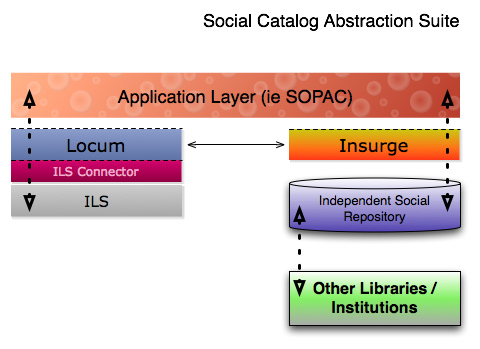
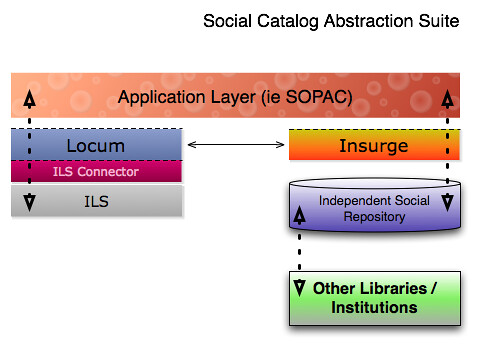
A year and a half ago, when he released the first version of the SOPAC for the Ann Arbor District Library (here’s his blog post), Blyberg’s extensive customizations were definitely cool, definitely innovative, and definitely had potential. He was working hard to put lipstick, a wig, and a dress on his pig. Well, now he’s covered the pig altogether. I won’t get into details (mostly because I only barely understand them myself), but he has coaxed his Drupal-based web site to pull information from their ILS rather than pushing the searcher into the ILS’s environment.

Other people have tried to insert new interfaces between their ILS and their patrons with more or less success, but I think Blyberg has just shown us an example of this type of project that not only works well (drawing on information from the ILS, from a local database of user-generated content, and potentially from a much larger database of user-generated content from other libraries), and is ILS-agnostic, butthat also looks good.

Here’s the diagram he uses to explain where all the information comes from:

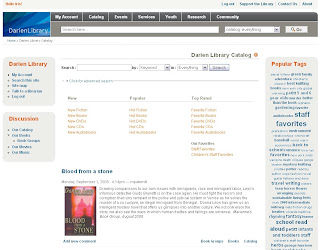
And here’s what the catalog looks like (notice the juicy tags on the left):
When you do a search, results appear in the main content area of this same screen, fully themed to match the site. So beautiful!

To say I’m jealous is an understatement. If we can’t bring ourselves to migrate ILSs, I want something like this. But I do have two reservations: this still requires the discovery layer to harvest and store information from the ILS, and that pig is still under there somewhere. As far as I can tell, the ILS is still locking down untold treasures in the form of data that catalogers have worked so hard to include in our records and it’s preventing us from exploiting that data fully. An actual relational database as the foundation for bibliographic information would make me so very happy. Still, this is really really exciting. I can’t wait to see if other libraries pick up this open source software and continue to develop it further.

Comments closed